
 I’ve been a Mac guy for almost my entire adult life. I wrote my first college papers on a typewriter, but by the end of my freshman year – almost 30 years ago – I was on an IBM PC. Then, in 1984, I found the Mac, and I never looked back.
Till now.
I’m not saying I’m switching, but I sure am open to a better solution. Because the past year or so has been dominated by the kind of computing nightmares that used to be the defining experience of my Windows-PC-wielding friends and colleagues. And it’s not limited to the Mac – the iPhone is also a massive fail in what was once the exclusive province of Apple: Ease of use.
I’ll caveat this post with the fact that I may be something of an outlier – I have thousands of contacts in my Apple contact database, and my iCal app is burdened with having to integrate with a multi-platform universe at work. And perhaps the fact that I love to take photographs, and have amassed more than 10,000 digital images, means that iPhoto has become mostly useless to me for anything other than as a storage vault. And that, apparently, is all my fault.
But my wife isn’t an outlier. She has about 250 contacts. She tries to use iCal, but can’t make it work. Her email breaks early and often. And she’s spent the past two months in IT hell, trying to salvage her digital life from the clutches of Apple’s self-centered, walled-garden update called the Lion operating system, which wiped out nearly all her previous settings and useful applications. Watching her struggles, and trying to help (and realizing I couldn’t without bringing in expensive professionals) made me wonder – whatever happened to ease of use?
I am certain this post will elicit all manner of Apple fanboys who claim I’m a moron, that I’ve brought upon my own demise through stupid decisions. Well, let’s review a few, and you can judge for yourself.
Honestly, where to start. How about with the iPhone itself? I have an iPhone 4, it’s about a year or so old. The contract is for two years, and I don’t feel like paying $400 to get a new phone. I figured this one must be good enough, right? Wrong.
The phone is pretty much useless now, because all of its storage is taken up. With what, you might ask? Well, it’s a mysterious yellow substance – found, in a masterstroke of intuitive design, in iTunes – called “other.” I was alerted to this issue when I couldn’t take a photo because my storage was full. Oh, and I was also told my storage was too full to download any more mail. And I’m an inbox zero kind of guy!

WTF is all this “other” shit, I wondered to myself. Well, that’s what Apple’s self-hosted forums are good for (I’ve been there a lot lately, for any number of issues, only a few of which I’ll detail in this post). So off to Google I headed – “what is the other in iphone storage” yielded this post, among a lot of others:

OK, so…should I restore the device from backup? How do you even do that? And if that doesn’t work, then what? I have to “restore as new”?
Sounds dangerous, like I might lose all my settings and apps and such. There had to be a better fix. I spent a half hour or so reading various forums, blog posts, and the like about the problem, which seems quite prevalent. Many of the suggestions are summarized in this post, and included deleting your browser cache (that was pretty easy, I did it, no luck), deleting your entire email account and recreating it (a pretty drastic thing to do, but funnily enough, I’ve done it about ten times in the past year due to problems with our connection to work mail, and since I’d done it recently, I figured that couldn’t be it), and my favorite:
Go to /var/mobile/Media/ApplicationArchives using SSH (requires jailbroken iPhone) or DiskAid and delete everything. This folder contains partially downloaded apps which never completed nor removed and were probably interrupted at some point in the middle of downloading.
Are you frickin’ kidding me? I have to jailbreak my phone to fix this problem?
Oh wait, that blog post suggested one last thing I could do: If the above steps fail, do a full system restore :(.
Again, very drastic. But I was getting impatient. I wanted my storage space back. I found another site, one that looked pretty official, that said this:
Unfortunately, scouring available information sources and speaking with Apple hasn’t led to any type of easy resolution.
If you’re experiencing this issue under any version of iTunes, you’ll need to restore your iPhone to reclaim the space occupied by Other. That is the only known solution at this time.
Well shit. I spent a few more fruitless hours trying to find another solution on the web. There wasn’t one that didn’t require pretty significant technical know-how (such as installing a utility, running it to reveal all files on the iPhone, then deleting each file one by one, even if you weren’t sure what the file did). The only option that was relatively straightforward and seemed to work, according to many forums, was to restore the phone.
Which I did. And I lost all my apps save the ones that come preinstalled on the iPhone in the first place. And guess what? It didn’t fix the problem.
OK, I’m going to stop on this example. Because the point isn’t to try to fix the problem (I know I’m going to have to go to an Apple store, and get a “Genius” to deal with this. And I know this “Genius” is going to tell me that my phone is old, and that I need a new one with more storage, and by the way, I should really get an iCloud account, because if I had one then I wouldn’t have a problem at all. In other words, Apple has architechted the iPhone in such a way as to insure that I spend much more money with Apple, and am committed to their cloud solution long term with my data. But that’s another rant). Oh, and the fact that Apple doesn’t respond in its forums about this (or any) issue? Ridonkulous.
My point is simply this: This. Ain’t. Easy.
Another example: iPhoto. May I just say, and I won’t be the first, that iPhoto is A Piece of Sh*t, in particular given how image-driven the company is in its own marketing. iPhoto is about as dumb as an application can be. Just launching the things often takes up my Mac’s entire CPU, crushing performance on anything else I have open (and no, my Macbook Pro isn’t old, it’s one of the newer models). Photos are organized by date, and there’s no easy way to change that. Album creation is utterly non-intuitive (again, I’m sure this is all my fault, Mr. Fanboy), and the “Faces” feature, which seemingly would fix a lot of these issues, is just plain useless.
Now, you Apple fanboys will scream at me: Hey Battelle, you wuss, don’t you know about Some Expert Photo Editing and Organizing Photo App That You Can Buy For Hundreds of Dollars. Or Some Bitchin’ Utility Written By A 19-Year-Old That Will Never Be Supported By Apple. Or something. Well I do, because I’ve searched high and low for help with iPhoto. Again, there are no easy solutions. I could take a class, yep. Or spend a few days manually tagging my photos. But wasn’t the point of the Mac that you SHOULDN’T HAVE TO DO THAT?!!
Another example: Nearly all of Apple’s built in “productivity” applications are terrible – email, contacts, calendaring, for starters. All of them are not ready for prime time. iCal is laughable as a shared calendar across platforms and the web – perhaps my IT department is filled with punters, but in five years, we’ve never been able to make iCal work seamlessly across pure Mac networks, not to mention with other solutions like Outlook or Google Calendar. And when we call Apple for support, it’s as if Apple really doesn’t care. Alas, we can’t seem to find anything better, so we limp along…apologizing when things “fall off the calendar” or, worse, when appointments stay on my iPhone calendar long after they’ve been moved from my main iCal on the Mac.
And dont’ get me started on Apple’s “Address Book.” As I said before, I have thousands of contacts. Is that so uncommon? Apparently it is. After months of trying to get my contacts to sync properly across my Mac, my assistant’s Mac, and both of our iPhones, my IT department finally got someone at Apple to admit that, well, the Address Book just doesn’t really work very well once you have more than about 1000 contacts. Seriously. Just – sorry, we don’t have a solution for that. We have found a fix – we use Plaxo – but now we’re dependent on Apple supporting Plaxo, which I’m not certain is a long term bet. Oh, and every time Plaxo syncs with Apple’s contacts, about one in ten of the contacts are duplicated. Why? No one knows. Is there a fix? Nope.
(And what if you want to sync to – gasp – an Android phone?! Well only way to do that is through a total hack involving Gmail. Seriously.)
Let me repeat my refrain: This. Ain’t. Easy.
Without going into detail, my little rant about Calendar, iPhoto, Address Book, et al goes for iTunes as well. I even bought a piece of software to try to fix iTunes myriad issues (Rinse). I can’t figure out whether or not Rinse has fixed anything, to be honest, and so far, all it’s managed to do is marry the wrong album art to about 100 or so songs which previously didn’t have any imagery. Which is kind of funny, but a tad annoying. And just the fact that there’s a market for something like Rinse kind of makes my point.
Oh, and then there’s the vaunted Apple Super Magical User Interface. You know, the Insanely Great Revolutionary Change the World User Experience that everyone fawns over as if it were a fact.
Are you kidding me? If Apple’s UI is magical, then I’ve got a Unicorn to sell you. Let’s start with Mac Lion. There are so many Fails in this OS, it’s hard to know where to start. You need a four-hour class just to understand all the contortions Apple seems to be doing in its attempt to make its desktop interface work the way the iPhone does. You know, pinch and swipe and app stores and mission controls and magic corners and all that. I’ve spent at least an hour figuring out how to turn most of that shit off. It just doesn’t work.
It’s really funny to watch my wife deal with all this, given she’s not exactly one to dig deep into system settings (you know, the very consumer Apple initial designed for). When she got Lion, the way her mouse, her iChat (now “iMessage” or someshit), and of course all her applications worked changed in very dramatic ways. For instance, she could no longer IM me – all of a sudden, she was on “me.com” and her IMs came to my cell phone as texts. (In other words, Apple defaulted to its own iCloud services, and wiped out her AIM-based identity). I’m sure this is all her fault, naturally.
Oh, and every time she clicks her mouse to try to move a window around, a message about “Icons and Text” appears. WTF? Little irritations like this happen all over the place, piling one upon the other until it crescendos with a long, wailing lament – WHAT AM I USING HERE – WINDOWS?!
But we all know the future is mobile, right? And the iPhone and iPad are Perfect Expressions of Beauty, Ideal Combinations of Form and Function. Except they’re Not.

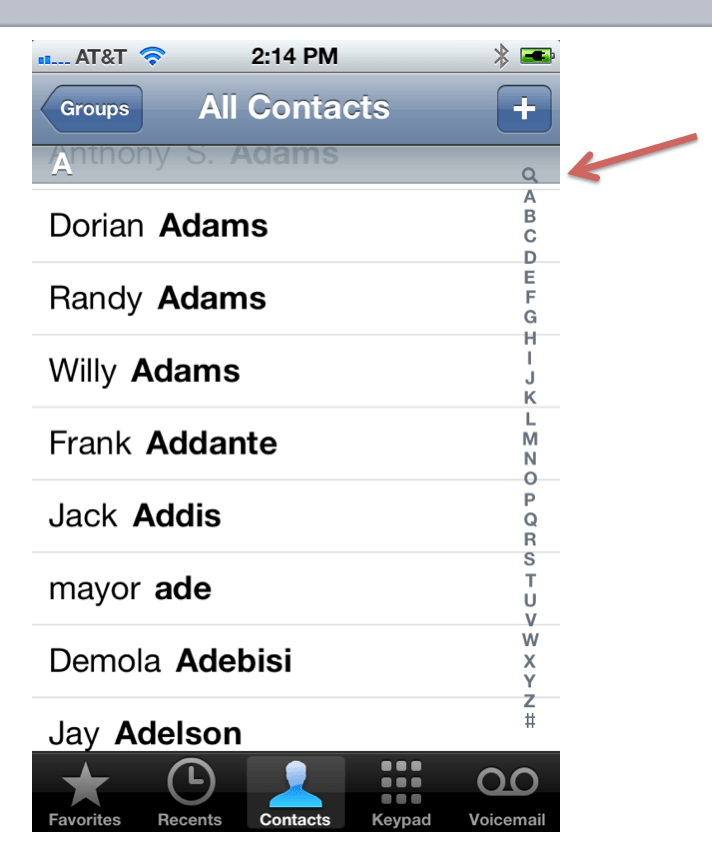
Have you ever done a search in your iPhone contacts? You need the fingers of a poorly fed six-year-old to activate that search function. No, really, I must waste four or five minutes a day trying to make that damn thing work.
Seriously, how can an adult finger ever touch that little search icon without either hitting the “A” or the “+”????
And then there the precious internationalization feature of the keyboard (see image at right). I must turn my texts and emails into Kanji ten times a day. And this is a feature??!
There are countless other examples of irritating UI features on the iPhone. Inconsistent navigation is a primary one, but …OK. I’m going to really stop now. Because I know, learning how to use the tools of computing is MY job, and I’m clearly falling down on it. I know there are ton of tips and tricks that would make my life easier, if only I took the time to learn them. If only I spent hours a week on the Mac tips websites and such. If only I wasn’t busy…writing rants like this one.
And I know that Andriod and Windows are hard to use too. And no, I’m certainly not going to install Linux.
My point is simply this: This stuff is too complicated. There has to be a better way. And while it used to be that Apple was the brand which uncomplicated computing, for me, anyway, that’s simply no longer true. Does anyone out there have similar experiences, or am I really an outlier?
Eh, it’s a computer… what do you expect?
I am a mac user but not a fanboy. I’m personally coveting the Lumia 920 (love windows phone!) and I don’t think apple craps rainbows at every given turn. I will say, however, for being such an “old-skool” mac user, you act as if previous mac OSes (OS 8 and OS 9 for example) never existed. I actually worked support for a large company for those OS revisions and there were just as many issues on them as well.
The problem isn’t that Apple is getting worse (although I don’t think they are getting better – and I’ll give you iPhoto is a P.o.S.). There were just as many problems before but people got used to them and they weren’t such a big deal. The new OSes have fixed those issues and brought with them new, different ones.
Also, you gotta realize that the average consumer always expects MORE with the next release. Snow Leopard was so frowned upon (as is the new iPhone 5) for not bringing enough change to the table. More features = more complexity = more things to possibly go wrong. Less features = less sales = Apple almost going out of business again.
There are so many things wrong with this article that I’m surprised you wrote it. I like this comment: “The Internet is a fascinating place where people with no knowledge post their opinions based on their lack of information.”
After more than a decade of iPod, you mean to tell me that you don’t know how to restore your device using iTunes? You don’t know that your apps and content are stored in iTunes and are simply synced back to your device after a restore? All that time you wasted searching for answers! The restore operation takes less than half an hour.
I won’t even comment on the idiotic rant about searching for contacts with fat fingers. Others already pointed out how easy it can be.
What I can’t understand is how you can flame Apple’s products as “not easy” and not provide a decent comparison with other products or systems. Do you know of a FREE photo app that handles over 10,000 images and offers all the features of iPhoto?
I didn’t see a mention of Pages, or Numbers, or Keynote — $20 Mac apps that are far better than Office and run on my iPad as well.
I guess I never had any of the problems you had. Not even with Mail and an Exchange Server. Yes, all of these systems, especially Windows (with Windows 7), have grown more complicated. Would you say that MS Word is now better than its previous versions? I doubt it. I certainly find it much harder to use (on Windows) compared to Pages on a Mac.
This is such a one-sided article that I don’t think it serves your readers well. I thought I would learn a few tips about fixing legitimate problems that Mac and iPhone users have. No such luck. I wasted time reading it, and wasted even more time writing this comment, which Apple haters will probably not read. You did arouse my attention, which (I think) is the only reason why you wrote it.
Actually, I wrote it because for me, it’s true. And I’d think Apple would want to take advantage of things like the fact that I have 10K photos in iPhoto. Picasa/Google sure want to. So does Facebook. Anyway, I read your comments, and I am learning from them and all the others. So thank you.
You have to remember that over time, things change. Yes I’ve been an Apple fan for more than 30 years, but I also realize that being involved in computer support for so long, I have to study and learn many new things every single day.
If you don’t want to get frustrated by new software and OS’s just stick with your abacus.
I can’t believe people agree with your ignorant attitude… until I remember that people still drink Coke and eat at McDonalds…
I hope that ignorance is bliss, because that is all you are… ignorant. Enjoy your bliss.
ha. You are right. I’ll take my Mac over an abacus.
Seems like the author bought into marketing fluff and is using the OS with rather unrealistic expectations of software consistency. If nothing is suitable for your needs, perhaps desktop and mobile computing isn’t for you.
Sorry, but i’ve been using iPhones since 2009 and recently bought a Mac about a year ago. It took some time getting used to how my Mac works, but that’s normal when you switch to any new computer system particularly when you’re used to a different one all your life. But most things either came intuitively or were easily available with Google.
Another option (that I wish I had taken advantage of) is head to an Apple store and participate in free classes. What other computer maker gives free tutorials from their staff on a regular basis and for free?
Yes I had similar experiences. With my ex-iPh4 too :). After long battles (all lost) and a lot of money and time thrown “in the cloud” and the lack of favourite music in iTunes (this was the cherry on the cake) I decided to quit. I took the phone and the charger and gave it as a gift to a 10 y/o neighbor. That moment was one of the happiest in my entire life. A super-heavy rock pressing on my heart dissapeared instantly. I am the last to brainwash anybody, I just tell my personal decisions. Since 6 month ago my way is called SG Note and I am really happy. No problems, even no netbook need anymore and a lot of time for pool. But I repeat, thats just my way. I also consider interesting the combination Nokia/Win8/Carl Zeiss. It’s a dream mix. But if you want Apple please remain to Apple ! Dont consider this an advice !
Battelle, you hit another out of the park (as evidenced by the growing comments). But its not so much the content that I want to point out, as the writing style. Since I own an iPhone, I only experienced a small portion of the issues you detailed, but I ‘felt the frustration’ as if I encountered each of them. Communicating the emotion so clearly using such authentic examples, is, IMHO, the most memorable part of this piece.
Why thank you. That is very nice of you to say. All the things I write on this site are first drafts, of course. The community does the editing, and is certainly doing it here.
If you want to search, drag the screen down a centimeter so you can see the giant search bar. Or when you’re trying to press the tiny letters on the side, just keep your thumb there and scroll up.
You’re doing it wrong.
I’m doing it wrong. I’m doing it right now
I have a lot of observations and comment about your blog post. I agree that Apple’s ease-of-use has suffered from a lack of clarity of vision with its file management system and seeming division between the iOS, iTunes and old desktop metaphors for navigating apps, data, and media. Files get suckled up into apps and you can not file them in iPhoto or iTunes. You have much less control and easy access to the metadata. In their attempt to hide the inner-workings of file management and make the apps store and analyze them in a primitive default fashion, they taken away a base level control. Even hiding the Library files is an act of condescension toward the Apple Mac user. And I can’t tell you how much I hate going into Apple Tech Forums and being attacked by fanboys for criticizing or providing feedback on broken design and unworking parts of Apple software or hardware. Recently my wife’s iPhone stopped ringing. I went to a Apple Tech Support Forum seeking answers, trying to narrow the problem to hardware or software I was attacked by their lurking fanboys who started accusing me of refusing to accept their prognosis – Go buy a new iPhone 4S and SHUT UP! – for the problem her ONE YEAR OLD iPhone was having not ringing. The hardware switch has been swapped out at the Apple store and we were legitimately trying to use standard troubleshooting procedures. Finally, Apple deleted my tech questions and blocked my access to their Support Forum. Who needs the arrogance of a bunch of self-righteous fanboys living in their mothers basement that hound these forums relentlessly. If things are broken, or even if they are not, Apple must be willing to listen to feedback. Like you, I’ve been a loyal Apple customer since 1984. I’ve advocated and literally working with Apple VARs sold thousands of Mac desktops, laptops, iPods, iPhones, and iPads and the dozens of them I’ve bought for myself and family members. With all the business I’ve given Apple, I don’t need to listen to bullshit from fanboys. There is little danger I am going to switch to vastly worse Windows or Lunix platforms but Apple BETTER start listening to its customers. iCloud is one hot mess. The way Apple treated MobileMe and dotmac faithful users is appalling. BOOM! wipe out accounts, lost data, bad syncing, unreliable restore… Wow, I worked in consumer software development Quality Assurance and that’s really a major fail. Having said all that iPhone and iPad are NOT failures. They are amazing in concept and hardware design. I think the whole platform and iPhone app developer model has been revolutionary for smartphones and mobile computing in general. What Apple has done with transforming the industry in the last 10 years is bold and innovative and all that any of the others have been able to do is COPY and imitate Apple. Part if that is a credit to Apple innovation but it is equally a failure for other hardware and software companies to execute original ideas. Apple needs to work to fix its problems and clarify its vision but the competition is appallingly bad.
Thanks for the thoughtful post.
I own a macbook right now. i’m a pretty technical guy but the only reason i know how to half the stuff i know how to do with my mac was because i got into the opensource/gnu/linux experience. i barely use any stock apple stuff anymore, and as soon as steam officially releases to Linux, i will be installing Xubuntu. Simple, fast, clean, and while not necessarily easy to get started with, all you need to know is free on the internet with a quick google search. I admit I am a tech geek, but i personally dislike, even leaving behind the philisophical debates, where apple and microsoft are going. Social integration with apple. turning our desktop into a tablet with microsoft. SERIOUSLY!! The only upside to this is that Linux gets more attention and people are more likely to switch.
I agree, at least in part. I made the switch to Apple when I bought an iMac about 4 years ago. I made the move because the Windoze offering at the time was the infamous, Vista, probably one of the worst OSs in history. I read an entire book on how to make the switch. I can honestly say that I haven’t found OSX to be, in most ways, any better than most versions of Windoze, excluding Vista. I’ve had some serious problems with my iMac (I’m posting from it right now) since it was new, to the point where after 10 visits to the Genius Bar in 14 months, Apple offered to replace my iMac with a new model if I agreed to not bring them this problem any more if it continued to occur. I took the offer, and it did recur. It’s finally gone away, through a number of upgrades to the OS, thank goodness. But it was a major PITA for over 3 years that even Apple couldn’t fix. But it is working fine now.
As to my iPhones, I’ve had a much better experience. I’ve had a few minor problems, but nothing worth mentioning. It works well and consistently, with the exception of Siri, who should be summarily executed without waiting until sunrise!
One helpful piece of information. You are accessing the Contacts Search box wrong. I didn’t even know that “Q” was up there until I read your article. It is impossible to hit, just as you said. But the way you access the Search field is simply to swipe downward when you are at the top of the Contacts list, and the Search box will show. Very easy. It does help to at least review some of the “Tips & Tricks” you see all over the net when a new IPhone comes out, just like with any OS.
Battelle, you hit another one out of
the park (as evidenced by the growing comments, so I hope you’ve put some time
aside in the next day or two). But it’s not so much the content that I want to
point out, as the writing style. Since I only own an iPhone, I actually
experienced a small portion of the issues you detailed, but I ‘felt the
frustration’ as if I encountered each of them, thanks to the authentic examples.
Communicating such emotions in an easy digestible style is, IMHO, a sign of
memorable writing.
“Go to /var/mobile/Media/ApplicationArchives using SSH (requires jailbroken iPhone) or DiskAid and delete everything. This folder contains partially downloaded apps which never completed nor removed and were probably interrupted at some point in the middle of downloading.”
This is the root fix.
Do you know the fact that OSX and iOS are UNIX-like systems?
Once you understand how flexible ( and powerful) UNIX-like systems should be.
You won’t feel that jailbreak is wrong.
Everyone deserve such freedom from device they own.
“And no, I’m certainly not going to install Linux.”
Linux is a the kernel supports OS like Ubuntu, Fedora, openSUSE, …
Even Android is based on Linux kernel with different upper layer stack.
Linux based desktop has bugs, countless bugs on the issue trackers.
So you decision is right.
But the different thing is, if you find something wrong in free / open source software, you usually have chance to communicate with developers directly (through mailing list, issue tracker). They are just there. They are not necessarily friendly, though.
Customer services are shit; they always try to accuse users.
Bravo.
I have only this to add, as fuel for this delightful fire: I get emails several times a year from my mother. She is no slouch with technology. She manages a fleet of Windows xp and 7 laptops for her business, and tends both a Windows 7 and a MacBook as personal rigs. She also tends to run out and update her phone to the latest iPhone every time one is offered anew. Her emails containing pleas for my amateur tech support are, almost without exception, related to the iPhone and the Mac. Sometimes I will ask her: “Say, is everything ok with the Windows rigs?” Her response is always the same: “Oh, yeah, no problems”
Her queries have become much less frequent since I weaned her off of Apple’s cloud services, iPhoto, and basically everything else having to do with Apple accounts and services. The Google equivalents are significantly less hostile to users and their adult children!
Also I’d like to say that after reading this, I can say without any pause that a PC running Windows 7 and any software for it written in the past 4 years is not nearly this hard to use.
Another vote for “Amen”…I’ve used most phones from all the biggies (iOS, Android, Blackberry, WinPhone, even iPaqs back in the day), and computers running Windows/OSX/Linux. I just bought the new MBP/Mtn Lion and have been helping my wife figure out glitches on her iPhone (4s) for the last year. Honestly…OSX/iOS aren’t any better than Win7/JellyBean – they just aren’t. In many ways (that John points out), they’re worse; in some, they’re better. They’re all just flavors, not saviors.
I think a significant part of the angst of realistic Apple fans, and the very existence of the Rapid Fanbois, is around Apple’s choice to market their products as a ‘lifestyle’. A lifestyle of creativity, independence, and beauty…a world where you don’t have to be a techie to use technology. Great campaign! And for many many years Apple lived up to that last part. It seems like they’ve stopped trying…but are still marketing it that way. That’s the key. If it’s merely a computer, you can take it or leave it. If it speaks to your sense of How The World Should Work…well… And Android fanbois fall into the same trap with the “open” b.s. It’s less controlled, but not really open.
People, it’s just another operating system designed by a very large company with an eye on making money and lots of partners/competitors they adjust for…just like Microsoft or Google. Win/OSX both have strengths, weaknesses, and tradeoffs. Anyone who says different is speaking from the heart, not the mind.
If I want simple video and music making, or kick-ass trackpads/keyboards/monitors, I’ll long for the Mac. If I want to crank through Office files (sorry, they’re default business apps) and have a gillion free helper apps, I’ll want Win7. If I dream about the best of both, utter freedom to customize and no corporate thumb, I’ll turn to Ubuntu. (though the hardware compatibility is a PITA). I dunno…triple boot? 🙂
Thanks for speaking Truth to (mock turtleneck) Power, John. Sorry for the fanboy drubbing you’re getting.
To scroll up in any application, including the contact app (aka to show the search field), just tap the menu bar (clock). This technique is also super helpful in safari when you want to input a new URL
I had a 11c, got my first Mac in 1986 and was a major, major Mac bigot for many years. I remember how shocked I was when I first tried OS X – it didn’t become even barely usable for software development until 10.2 (and that only because there were decent third party tools available), and it was 10.3 at least before it started to approach the usability of OS9. I had my doubts before, but Win7 finally got me to the point where I prefer using Windows. It has its problems of course, but networking that works, printing that works, and apps that work outweigh them. I’ve been using Server 2012 at work and find that I like it; I was worried about Win8 being as lobotomized as Mountain Lion, but it’s actually better than 7 in many ways, and much more productive than any Mac in the last ten years.
I enjoyed writing software for Classic Mac way more than I do any flavor of OS X: it’s not as “modern” and took more time and effort to master, but it was _fun_. CodeWarrior was a better dev environment than Visual Studio, but it’s gone and XCode is awful, just awful.
I recently ditched my iPhone (swapped it even for a Windows 7.5 Phone that’s way more fun to use too.) I’m writing this on a CoreDuo Powerbook Pro that I really don’t think I’ll replace when it goes. The new MacBook Pro is cool, but then I found how much more machine I could get for how much less if it didn’t say Apple on it.
My advice to anyone who wants to go/stay Mac is not to bother with any of Apple’s apps, bite the bullet and buy good ones. I still use the Finder and Terminal, sometimes Preview, but I find Thunderbird, Chrome, and (no more Mac development) to be the key to a happy life (along with Snow Leopard.) I regret the ability to resize a window from any edge: that was worth the price of Lion to me, but not the rest of the package.
I am shocked that you have been using Apple products for all this time and you can’t recognise a feature when you see it. This is included to remind you of the benefits of buying a more recent iPhone. Because iPhones are so reliable it is necessary to break the phone by software means in order that users will not stagnate and grow miserable as a result.
Microsoft is just much more mature when it comes to software engineering. Apple makes beautiful hardware, no doubt, but they’ve got nothing on Redmond when it comes to software. Actually, let me rephrase that : they’ve got nothing on Microsoft with regards to function; when it comes to bling however, Apple shines.
Microsoft publishes bloated crapware. There office software was once a beautiful thing, but that was at least a decade ago. Once they started putting graphics editors in Word, the honeymoon was over.
It’s true. Up until now, they were publishing “bloated crapware”. This is no longer the truth : take a look at the new Outlook, or office365 for that matter. Microsoft has realized it was lagging behind the competition and has now reacted accordingly. I’m a developer and thus used to hate IE, but even I have to admit that ie10 is a great browser.
no thanks. that’s how it works. they lost me. I don’t have to ‘try again.’ are you stupid or just ignorant?
I have never been an apple user, but my wife had an iPhone and it was horrible. Not for her to use, but for me to administrate. Backing up or syncing contacts to something else but Apple is close to impossible and the worst: If something goes wrong or breaks (and this is a fact in IT world that by getting more and more complex) I have quite no possibility to fix it other than jailbreaking the iPhone and doing a lot of hacks. My wife’s iPhone at some point did not get e-mail any more and I never could figure out why. Neither was I able to clean the cache or data so that it worked again. Solution was: Bought an Android phone for her, because I had good experiences with that. I even already had the SD card rotten but the system reported that and so I replaced it and it worked again. Before that (maybe as the beginning of hardware failure) it happened two times that I did not get email any more but clearing cache through the settings menu solved that.
As a former Windows user I find Apple – from administrators point of view – even worse than Apple.
While all over the IT world there is the wish to make everything easy to use but in the same time to manage the field getting more complex there is even a loss of features in many cases while narrowing down GUI.
I don’t have THE solution for you. I am far from being really satisfied with IT.
However, since my wife changed to Android (Samsung Galaxy S II) she also had one time email not arriving any more – also cleaned the cache, reboot and done. While on Android you also need to root your device for full control, even without rooting (which I don’t do) I have much more control over the phone as on the iPhone.
I am an IT guy so I want to have the control over the system. I want to decide how and what apps to use. This is why I settled with Linux where I can decide everything, from the kernel to desktop environment and all the other apps and I can configure the behavior into detail.
That said, my wife use Linux in it’s pretty defaults and she needs only very few support in using it. But: She doesn’t have much needs – just email, web, office and some image viewing.
Love apple TOTALLY agree with you…help
Mr. Battelle, I agree with you.
Something I recently discovered, although too late to help you reclaim your space on your iphone – Go to Settings, General, Usage. Look under Storage and you will see the apps and how much space they use. Many of those apps for whatever reason will be using much more space than they should – for example, i have TWC using almost 400MB. Delete the app from the phone & reinstall. You will likely find at least several apps using more space than would seem reasonable. Now wasn’t that simple??
alas that is not the issue. I am going to have to restore my phone again….and if that does not work, go to the Genius bar
Your “certainty” will be your undoing. Linux is the easiest UI you could be running on Apple hardware…
I have also noticed this trend – But (and not being a fanboy here) I really found that google docs, calendar, and mail work fantastically for me – all my stuff is cloud based now (ok I use dropbox more than drive but that’s because dropbox was there first)
I really feel that google is starting to get this right – I remember ranting that google should go hire the UI designers from apple – offer them a load of money to sort out what was a load of great tools, but uuuuuugly and complicated. Now they appear to have that nailed. All I’m waiting for now is online versions of the software I use regularly (and they look like they are on the way) and I will happily use any computer with google chrome/firefox on it.
Since 1 year-olds can use the iPhone, you must be an outlier.
Since 1 year-olds and grandmothers can use Apple’s products better than Windows or Android products, I think you are an outlier. Or at least your brain hasn’t evolved with the rest of society.
Spot on John!
I started computing life as a Mac user way back when in the last century. Then the world of work dawned so it was off to PC-school. In the meantime Mac use has blown up outside schools and the hype is all about Apple so I thought I’d have another look.
The hardware is lovely. I bought a Macbook Pro and I’m impressed with the speed of the thing running Win7 on a partition. It’s better than HP desktops at work. There are drawbacks mostly related to not having certain keys that I’d regularly use on a Windows machine, but I manage. There are weird design things like USB ports so closely spaced that I can’t directly stick to memory sticks in there at the same time. Or no provision to stick a SIM card for all of us needing to get some work done on the go. Didn’t somebody in design think about this? Isn’t it strange that the lifestyle iPad has a SIM card slot but the more professional offering doesn’t? Other that those couple of things I’m generally happier with the hardware than the PC laptop offerings.
The software side of Apple is a less happy story. I’ve tried out some of the stock stuff on the other side of my partition. You’ve written about it already so thanks; Address Book, Mail and so on are major letdowns. Migrating your stuff is a headache. Most other contact management systems allow you to point to a CSV file but Apple doesn’t provide for that. (I have to admit that I’m now pissed off at RIM for dropping that support when it moved to v7 of its Desktop Manager; professional users with thousands of contacts value stuff like that). Like some others have said I also find that faux legal pad or leather-look skins horrid. (They are also hugely context-specific because Americans identify with them way, way, way more than the rest of the world so it’s kinda arb to not allow style elements like that to get changed).
I’d like to add to add to the voices of others about iTunes which you forgot in your note. It’s basically crafted so that you open the application, buy and listen (or watch). If you try to do anything more such as reorder where your data should live, it rains problems because as I’ve since learned, iTunes relies heavily on Default locations and fixed links. You don’t simply move stuff where you want and tell the application to always suck-up-whatever-lives-in-this-folder. If you put a new file in a folder, you have to go tell iTunes that. If you delete an app (I have an iPad too) you have to do it from App menu. (Deleting it on your device is not good enough because when you connect it to iTunes again, it restores it to your device). I have bought apps where I’m supposed to able able to use iTunes to upload the CSV file but haven’t been able to do so and feel dumb. Wasn’t Apple software supposed to be designed to lift me from this sort of funk?
I could go on and on but like you say, it doesn’t feel at all like Apple cares really. Like you said, it doesn’t look like they care to actively engage with their user community which I fear is going to result in user alienation down the line. Just like RIM, and guess what? RIM hardware takes a pounding and keeps getting up. Just because APPL and RIM make solids cases doesn’t mean they couldn’t become coffins of sorts. Just sayin’ ..
You know you can drag your finger up and down the ABCDEF..XYZ strip. You don’t need to tap the right number.
The other school inside Apple of UI design is the one following skeuomorphic design – the yellow legal pad metaphor for note pad, the stitched leather brief for iPad contacts, the green flannel and faux-wood plastic in games center or in Garage Band. I suppose this designer metaphor borrows from the past “comfort-food” experience in using the apps and gives the uninitiated entrée into the world of software tools. Does anyone else find this tacky? just think they need to reign their UI design in a bit. And the primary repeated source of my frustration using Apple Lion, Leopard, Snow Leopard and after is file management, hidden files and metadata that is not accessible but predicts default behavior.
Tacky and rather uninspired.
You just just don’t understand how the system works. Yes, you can use it for work, but it isn’t meant for EVERYBODY IN THE WHOLE WORKFORCE to use. it’s mainly for personal use only. as for the “other”, it happens to be those 1000 contacts, files, and other stuff that you probably have on your phone. Did you know that you have to clear your safari browser every now and again of history/data? Oh, and that search icon in the list? You can get to that by scrolling to top of the list by tapping the status bar, and then pulling down on the list. It’s been like this forever. as for your address book not syncing, unless your iphone is an iphone 4 or higher, it isn’t supported on the stupid network anyway. The phone needs to be plugged in and locked, and your computer should have everything updated in both addressbook and made sure that it’s properly sent. You’re getting old dude 😛
Nope, it’s not what you think it is. A post on what it actually was – corrupted firmware and a bug in how the OS handles Voice memo files – is coming.
All hell breaks loose on this one! lol: I’m definitely a big fan of apple but yes, there are some flaws with the latest release. However, so does every other OS – each have their unique home-brew issues.
I’m a one-to-one subscriber and I would recommend the service to all; I walked in an apple store and within 15 minutes, all my presets were restored, problem solved! They have the best support system on the planet and that’s what make’s a big difference to me – their pit crew is exceptional, period!
I hope you don’t get black listed jbat! 🙂
-Peace
They are not as good as all that, I wish they were. I was at the Genius bar. They failed to fix the issue. More in my next post.
Sounds to me like an RTFM error.
Finally someone said it. This is so true. I still love my iPhone, but it sure can drive you crazy sometimes.
Check out my new updated post, at the top of the site
Try buying a new MacBook Air. At home and the office, I lose wifi at least once a day, after reading about it endlessly on Apple’s forum, you know the solution? Reboot your router! My PC has been turned on for months and never once has it lost a wifi connection. So, I need to get up, go to another room, give everyone a heads up that I am restarting the router, disrupting their work, and hope this doesn’t happen again for at least another 12 hours or so.
I tried to download the latest version of Bootcamp on my Air and it did not work. After long forum scouting, I learned that I needed to change a *standard setting* in the network control panel. “It just works.” Yeah, right.
if you’re still having issues with “other” space taken up on your phone, try getting one of the phone browser programs for your computer — iphonebrowser http://code.google.com/p/iphonebrowser/, iExplorer http://www.macroplant.com/iexplorer/, Phone Disk http://www.macroplant.com/phonedisk/, etc. — they don’t require jail-breaking to be able to see the non-protected section of storage.
Phone Disk is really the ideal–if you’re comfortable in Terminal, you can do a very fine-grained analysis of disk usage without needing to buy a license, since just checking file sizes doesn’t actually transfer any data.
when I’ve had large “other” blocks on my iPhone, it’s generally been due to bad behavior by the Photos app. it seems to save absurdly large thumbnail cache files which it can’t clean up properly. these can be deleted without affecting your own photos.
i’ve also had Camera lose track of pictures and videos, to the point where you can have a GB or two of video data lying around in DCIM somewhere. sometimes Image Capture can pull these out, sometimes you have to use iExplorer.
for the record, i should note that the existence of either of these problems, and the amount of work required to discover, let alone implement, their solutions, both constitute gross incompetence on apple’s part. i still love apple, but i don’t like them all that much anymore.
let’s not even talk about what safari is like on lion….
See my post today….
+1 for Apple = Stupid.
Apple pushes the iWork suite as a replacement for MsOffice which is fine but as usual it over hypes it and most users are told it is a total transparent replacement, which it is not.
There are boundless lists of sheer dumbery in the iWork implementation, starting with its installation.
Most users get to iWork via the demo version. Unfortunately the demo version is poison to the bought version. People pay for iWork or its components only to have the demo version still cut in and demand a serial number after 30 days. You need to scour through your System folder to delete every last vestige of the demo install, before reinstalling iWork all over again. None of this is explained by Apple who also hides the System Folder from users to compound the problem.
That really is what I object to most about where Apple is heading. It hides just about everything these days and uses hidden commands and contextual UI that you need to align the planets on first before you can actually see what you’re looking for. Having made things so complex, it changes them and changes them back almost randomly so you are never sure what is working in this particular implementation of the System or application installed on your particular hardware.
They promised a stack of “features” in Lion. Some of them like syncing with iCloud “transparently” were plain lies. Others such as eliminating Save As and many of the productive keyboard shortcuts are just plain annoying. All that along with the alternating directions of scrolling and weird missing keystrokes slow the user down, redoing their work incessantly.
Sigh, the sad thing is the worse Apple stuffs things up the more the new punters love it. I guess they have no memory of how it used to work and for them it just is.
You know, the odd thing is, the apple fanboys have not shown up at all here. I wonder why.
Because this blog sucks
I’ve been saying this for a few years now. Every time I pick up an iOS device, I feel like an idiot, because I can’t figure out how to make it work.
Most recent versions of OSX have been utterly miserable. In an effort to make things appear simpler, they’ve made them far more complicated. The recent changes to the way files are saved and managed are infuriatingly broken.
My most recent experience was trying to get a ring tone onto an iPhone. On Android this was super straightforward and intuitive. On iOS, it was a complete nightmare of Googling and no straight answers.
In the end, it turned out to be something like a 10 step process that NO ONE would have ever figured out on their own. It also required understanding the iTunes sync voodoo that puts the user’s iPhone at risk of getting their files wiped off it if they happen to not plug the phone into their personal, “canonical” library.
The only people who seem to really understand iOS and iTunes are those who have been burned by it several times and understand what traps to avoid. This is the face of “easy to use” software?
Modern Apple likes to wrap complex functionality into one massive assumption and then hides it all behind one vaguely named button with a wink and a smile that says “trust us”.
Making software that both looks easy and is intuitive to use is insanely difficult. Apple is only good at the former these days.
I am still a Windows7 user, but I have a new iPad. U r right. iPhoto sucks. Pages suck. Etc. But I am thinking of the Mac 27″ Desktop Mountain Lion because I’m writing a book with embedded audio & video in the text. I can get an equivalent Windows 7 AIO for a lot cheaper, but don’t know what’ll happen with Windows 8. Advice?
I wish I had advice but I have no idea…
Don’t get Windows 8 for a desktop PC just yet. Stay with 7. Don’t buy an iMac right now. Two year old tech. Either wait for the Ivy Bridge model (long overdue) or get the Haswell one which they may or may not make next year.