
 I’ve been a Mac guy for almost my entire adult life. I wrote my first college papers on a typewriter, but by the end of my freshman year – almost 30 years ago – I was on an IBM PC. Then, in 1984, I found the Mac, and I never looked back.
Till now.
I’m not saying I’m switching, but I sure am open to a better solution. Because the past year or so has been dominated by the kind of computing nightmares that used to be the defining experience of my Windows-PC-wielding friends and colleagues. And it’s not limited to the Mac – the iPhone is also a massive fail in what was once the exclusive province of Apple: Ease of use.
I’ll caveat this post with the fact that I may be something of an outlier – I have thousands of contacts in my Apple contact database, and my iCal app is burdened with having to integrate with a multi-platform universe at work. And perhaps the fact that I love to take photographs, and have amassed more than 10,000 digital images, means that iPhoto has become mostly useless to me for anything other than as a storage vault. And that, apparently, is all my fault.
But my wife isn’t an outlier. She has about 250 contacts. She tries to use iCal, but can’t make it work. Her email breaks early and often. And she’s spent the past two months in IT hell, trying to salvage her digital life from the clutches of Apple’s self-centered, walled-garden update called the Lion operating system, which wiped out nearly all her previous settings and useful applications. Watching her struggles, and trying to help (and realizing I couldn’t without bringing in expensive professionals) made me wonder – whatever happened to ease of use?
I am certain this post will elicit all manner of Apple fanboys who claim I’m a moron, that I’ve brought upon my own demise through stupid decisions. Well, let’s review a few, and you can judge for yourself.
Honestly, where to start. How about with the iPhone itself? I have an iPhone 4, it’s about a year or so old. The contract is for two years, and I don’t feel like paying $400 to get a new phone. I figured this one must be good enough, right? Wrong.
The phone is pretty much useless now, because all of its storage is taken up. With what, you might ask? Well, it’s a mysterious yellow substance – found, in a masterstroke of intuitive design, in iTunes – called “other.” I was alerted to this issue when I couldn’t take a photo because my storage was full. Oh, and I was also told my storage was too full to download any more mail. And I’m an inbox zero kind of guy!

WTF is all this “other” shit, I wondered to myself. Well, that’s what Apple’s self-hosted forums are good for (I’ve been there a lot lately, for any number of issues, only a few of which I’ll detail in this post). So off to Google I headed – “what is the other in iphone storage” yielded this post, among a lot of others:

OK, so…should I restore the device from backup? How do you even do that? And if that doesn’t work, then what? I have to “restore as new”?
Sounds dangerous, like I might lose all my settings and apps and such. There had to be a better fix. I spent a half hour or so reading various forums, blog posts, and the like about the problem, which seems quite prevalent. Many of the suggestions are summarized in this post, and included deleting your browser cache (that was pretty easy, I did it, no luck), deleting your entire email account and recreating it (a pretty drastic thing to do, but funnily enough, I’ve done it about ten times in the past year due to problems with our connection to work mail, and since I’d done it recently, I figured that couldn’t be it), and my favorite:
Go to /var/mobile/Media/ApplicationArchives using SSH (requires jailbroken iPhone) or DiskAid and delete everything. This folder contains partially downloaded apps which never completed nor removed and were probably interrupted at some point in the middle of downloading.
Are you frickin’ kidding me? I have to jailbreak my phone to fix this problem?
Oh wait, that blog post suggested one last thing I could do: If the above steps fail, do a full system restore :(.
Again, very drastic. But I was getting impatient. I wanted my storage space back. I found another site, one that looked pretty official, that said this:
Unfortunately, scouring available information sources and speaking with Apple hasn’t led to any type of easy resolution.
If you’re experiencing this issue under any version of iTunes, you’ll need to restore your iPhone to reclaim the space occupied by Other. That is the only known solution at this time.
Well shit. I spent a few more fruitless hours trying to find another solution on the web. There wasn’t one that didn’t require pretty significant technical know-how (such as installing a utility, running it to reveal all files on the iPhone, then deleting each file one by one, even if you weren’t sure what the file did). The only option that was relatively straightforward and seemed to work, according to many forums, was to restore the phone.
Which I did. And I lost all my apps save the ones that come preinstalled on the iPhone in the first place. And guess what? It didn’t fix the problem.
OK, I’m going to stop on this example. Because the point isn’t to try to fix the problem (I know I’m going to have to go to an Apple store, and get a “Genius” to deal with this. And I know this “Genius” is going to tell me that my phone is old, and that I need a new one with more storage, and by the way, I should really get an iCloud account, because if I had one then I wouldn’t have a problem at all. In other words, Apple has architechted the iPhone in such a way as to insure that I spend much more money with Apple, and am committed to their cloud solution long term with my data. But that’s another rant). Oh, and the fact that Apple doesn’t respond in its forums about this (or any) issue? Ridonkulous.
My point is simply this: This. Ain’t. Easy.
Another example: iPhoto. May I just say, and I won’t be the first, that iPhoto is A Piece of Sh*t, in particular given how image-driven the company is in its own marketing. iPhoto is about as dumb as an application can be. Just launching the things often takes up my Mac’s entire CPU, crushing performance on anything else I have open (and no, my Macbook Pro isn’t old, it’s one of the newer models). Photos are organized by date, and there’s no easy way to change that. Album creation is utterly non-intuitive (again, I’m sure this is all my fault, Mr. Fanboy), and the “Faces” feature, which seemingly would fix a lot of these issues, is just plain useless.
Now, you Apple fanboys will scream at me: Hey Battelle, you wuss, don’t you know about Some Expert Photo Editing and Organizing Photo App That You Can Buy For Hundreds of Dollars. Or Some Bitchin’ Utility Written By A 19-Year-Old That Will Never Be Supported By Apple. Or something. Well I do, because I’ve searched high and low for help with iPhoto. Again, there are no easy solutions. I could take a class, yep. Or spend a few days manually tagging my photos. But wasn’t the point of the Mac that you SHOULDN’T HAVE TO DO THAT?!!
Another example: Nearly all of Apple’s built in “productivity” applications are terrible – email, contacts, calendaring, for starters. All of them are not ready for prime time. iCal is laughable as a shared calendar across platforms and the web – perhaps my IT department is filled with punters, but in five years, we’ve never been able to make iCal work seamlessly across pure Mac networks, not to mention with other solutions like Outlook or Google Calendar. And when we call Apple for support, it’s as if Apple really doesn’t care. Alas, we can’t seem to find anything better, so we limp along…apologizing when things “fall off the calendar” or, worse, when appointments stay on my iPhone calendar long after they’ve been moved from my main iCal on the Mac.
And dont’ get me started on Apple’s “Address Book.” As I said before, I have thousands of contacts. Is that so uncommon? Apparently it is. After months of trying to get my contacts to sync properly across my Mac, my assistant’s Mac, and both of our iPhones, my IT department finally got someone at Apple to admit that, well, the Address Book just doesn’t really work very well once you have more than about 1000 contacts. Seriously. Just – sorry, we don’t have a solution for that. We have found a fix – we use Plaxo – but now we’re dependent on Apple supporting Plaxo, which I’m not certain is a long term bet. Oh, and every time Plaxo syncs with Apple’s contacts, about one in ten of the contacts are duplicated. Why? No one knows. Is there a fix? Nope.
(And what if you want to sync to – gasp – an Android phone?! Well only way to do that is through a total hack involving Gmail. Seriously.)
Let me repeat my refrain: This. Ain’t. Easy.
Without going into detail, my little rant about Calendar, iPhoto, Address Book, et al goes for iTunes as well. I even bought a piece of software to try to fix iTunes myriad issues (Rinse). I can’t figure out whether or not Rinse has fixed anything, to be honest, and so far, all it’s managed to do is marry the wrong album art to about 100 or so songs which previously didn’t have any imagery. Which is kind of funny, but a tad annoying. And just the fact that there’s a market for something like Rinse kind of makes my point.
Oh, and then there’s the vaunted Apple Super Magical User Interface. You know, the Insanely Great Revolutionary Change the World User Experience that everyone fawns over as if it were a fact.
Are you kidding me? If Apple’s UI is magical, then I’ve got a Unicorn to sell you. Let’s start with Mac Lion. There are so many Fails in this OS, it’s hard to know where to start. You need a four-hour class just to understand all the contortions Apple seems to be doing in its attempt to make its desktop interface work the way the iPhone does. You know, pinch and swipe and app stores and mission controls and magic corners and all that. I’ve spent at least an hour figuring out how to turn most of that shit off. It just doesn’t work.
It’s really funny to watch my wife deal with all this, given she’s not exactly one to dig deep into system settings (you know, the very consumer Apple initial designed for). When she got Lion, the way her mouse, her iChat (now “iMessage” or someshit), and of course all her applications worked changed in very dramatic ways. For instance, she could no longer IM me – all of a sudden, she was on “me.com” and her IMs came to my cell phone as texts. (In other words, Apple defaulted to its own iCloud services, and wiped out her AIM-based identity). I’m sure this is all her fault, naturally.
Oh, and every time she clicks her mouse to try to move a window around, a message about “Icons and Text” appears. WTF? Little irritations like this happen all over the place, piling one upon the other until it crescendos with a long, wailing lament – WHAT AM I USING HERE – WINDOWS?!
But we all know the future is mobile, right? And the iPhone and iPad are Perfect Expressions of Beauty, Ideal Combinations of Form and Function. Except they’re Not.

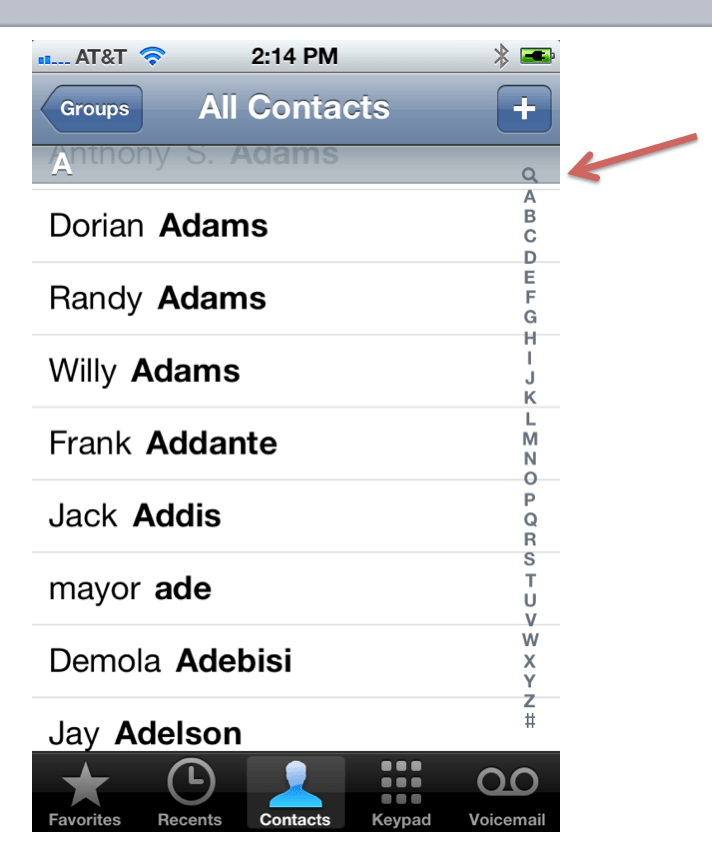
Have you ever done a search in your iPhone contacts? You need the fingers of a poorly fed six-year-old to activate that search function. No, really, I must waste four or five minutes a day trying to make that damn thing work.
Seriously, how can an adult finger ever touch that little search icon without either hitting the “A” or the “+”????
And then there the precious internationalization feature of the keyboard (see image at right). I must turn my texts and emails into Kanji ten times a day. And this is a feature??!
There are countless other examples of irritating UI features on the iPhone. Inconsistent navigation is a primary one, but …OK. I’m going to really stop now. Because I know, learning how to use the tools of computing is MY job, and I’m clearly falling down on it. I know there are ton of tips and tricks that would make my life easier, if only I took the time to learn them. If only I spent hours a week on the Mac tips websites and such. If only I wasn’t busy…writing rants like this one.
And I know that Andriod and Windows are hard to use too. And no, I’m certainly not going to install Linux.
My point is simply this: This stuff is too complicated. There has to be a better way. And while it used to be that Apple was the brand which uncomplicated computing, for me, anyway, that’s simply no longer true. Does anyone out there have similar experiences, or am I really an outlier?
You’re not an outlier. This is precisely why I switched to the Googleverse for my mail, calendar, docs, and contacts. Not having to deal with local apps AT ALL makes my life so much simpler. (And no, I don’t think Google is The One True Cloud Answer. You could probably do as well with any number of other services. I personally find the Googleverse convenient, fast, and reasonably well designed.)
I spend very little time in desktop apps any more. I’m not dependent on any one device. Hardware failures don’t scare me any more. I wipe my phone regularly (I enjoy playing with custom Android ROMs) and it’s no big deal. I’ve resurrected an ancient Dell laptop as a de facto Chromebook (Lubuntu, but running nothing else besides Chrome), and It Just Works.
Cloud failures scare me now instead… I need a more complete or automated cloud backup solution… probably involving Dropbox, Skydrive, or AWS, so I’m not reliant on Google alone.
I’m thisclose to biting the bullet and going with ChromeOS for my next mobile device. Photo and video editing are the only things I do in local software any more. Photo editing is possible but clumsy in the cloud. Google really needs to do a full Picasa port to HTML5/NaCl and support local editing before uploading. Video editing is a ways off, at least until the feature set is comparable to iMovie or Premiere Elements. I’d like to be able to do that on a laptop, so I think I’m a couple years off from dumping local software entirely… but having those be the only local software left is very liberating.
Any computer/phone with a full disk will suck to use – this is universal. Your first step should be finding out what filled up your iPhone, a great place to start is to go into Settings ➞ General ➞ Usage and wait for the Storage report to fill up, that is where you’ll most likely find the storage hogs. It’s highly probable you’ve put more apps with content in your phone than you would believe.
I have had a macbook pro for almost 6 years which has lasted at least twice longer than my two previous Toshiba laptops. I do not own an iPhone or have not tried the new OS for mac laptops. However, my own experience with macbook pro is that they are built to last. More importantly, the in store customer service is superb. I did have a few problems with my laptop that were resolved expediently and with relative ease (I did have the extended warranty). This I suspect woud not have been the case with a PC laptop (based on my experience with Toshiba). So, I do think that Apple still shines in customer service and product quality. However, the competition should make it easier for frustrated people such as yourself to make a switch but I don’t think they are there yet.
Although I don’t have many issues figuring out my Mac, I do have to figure it out from time time. That means it isn’t “easy”. What I think of as “easy” is asking my Mom to do something on my Mac or iOS device. If SHE can figure it out, then the task is probably “easy” as she is completely unwilling to learn how something is done on a computer for fear of breaking something (her experience is that computers are expensive and prone to failure and she doesn’t want to be blamed should one break).
You aren’t an outlier. I felt the migration from Snow Leopard to Lion was especially fraught with pitfalls for even experienced Mac users. Conversely what should have been fraught with error, the upgrade from Lion to Mountain Lion, because of its dependence on internet access, was the simplest upgrade I have EVER experienced on the Mac.
Although Mountain Lion has eliminated the source of most spinning beach balls, iPhoto, iTunes, and the Flash plug-in for Safari are still huge memory hogs. As Willy might say, “I feel your pain.”
The alphabet in the contacts app, including the tiny search icon, is meant to be scrubbed not pressed. So slide your finger across it to move around alphabetically.
Windows 7 is a better OS. It just is. I switched to Mac, iPhone, and iPad beginning in 2003 or 2004 after 15 or so years of Windows. Win 7 is just a better OS, period. I’ve switched back for the couple years. I’m anxiously awaiting Windows Phone 8, and Surface tablets. Goodbye Apple!
Same here. I used Mac back in 2009/2010 and switched back to PC (high-end hardware yet still cheaper than a mac) when Windows 7 came out because I was way more productive on it.
That fancy, childish-looking animated dock is annoying. It’s much more intrusive and obtrusive than the Windows task bar. It actually gets in the way.
Apple’s products are compared to an imaginary perfection.
Microsoft and Google products are compared to going without them entirely.
That’s why there’s been people like yourself handwringing over minute details of everything Apple does, while the unwashed masses make excuses for the completely ridiculous, unintuitive and ugly design of everything in Windows, Android and so on.
But do continue! Your harping will only refine Apple’s slightest flaws, while those making excuses for Apple’s competitors will make it certain that those alternative never really try too hard.
Daniel is lost, Apple is holier than thou to him
I think what you are missing is that it is ALL becoming more complicated. But that is also because we expect a lot more of our devices than we did just a few years ago. It wasn’t that long ago that I had a phone that had an address book that didn’t sync to anything that could send texts and that was it, and that was pretty advanced. But now it is a handheld computer that takes pictures and video and surfs the web and has a bazillion apps. It is the same for our computers. The things that we use our computers for we weren’t doing 10 or 15 years ago.
And scale is a big problem. The average users doesn’t have those kinds of contacts. But I have run into plenty who have pounded iPhoto with too many pictures. I think that level of scale has been an area that Apple has not done well at.
I definitely agree. My wife has the iPhone 4 and we’re constantly finding small things about it that just bug. For example: You can’t always tell exactly what time you send or receive a text message. Sometimes it’s nice to be able to gauge about what time you did something based on when you sent or received a text message. But if you’re looking to do that with the iPhone, forget about it. My HTC EVO tells me exactly when I sent and received a text.
Also, my wife is constantly hitting the mute button with her cheek when she is talking on the phone. My EVO’s screen blacks out whenever it is covered so no buttons can be pressed when it is up to the ear. I think this is is a genius feature and am surprised it’s not a feature of the iPhone. Maybe it is and we just have to toggle some switch but I’ve played with it for a long time and haven’t been able to fix the problem.
Just little things like that surprise me about the iPhone. My wife’s experience with her phone has made me grateful for my EVO.
Apple has it’s hands full to make iCloud work for non-Apple files but other then that… Apple products are the easiest technological solution.
I had that “Other” problem with my 8GB Touch. I wiped it and when it said “welcome to your new iPod” I selected “restore from iCloud backup.” It was fully restored, including the app data! I’ve also done this process with my iPad, but wiping it through Find My iPhone, because I forgot my iPad password.
What corporate email backend do you use? Our iPhones work great with Exchange Active Sync — contacts, calendar, etc. That being said I use Ubuntu at work and remote into a Windows 7 VM for Outlook and Exchange access. At home I use Ubuntu, Nexus 7, a Chromebook CR-48, and Windows 7 for gaming. My cell is CyanogenMod 10 on Samsung galaxy Note. I am very happy with the Google ecosystem so far for personal use.
Exchange…
yep Exchange Active Sync works amazingly. Then leave your company and try Outlook without Exchange – total bust for iphone 2 way sync – miss it like someone cut off an arm
answer simple: you are now on the old side and things seem more difficult for you than they used to …young ones do not have your issues.
Nor my cruft…
I stopped reading after the second sh*t. Nice mouth, lotta class.
Yeah, sorry. I do swear a fucking lot.
I agree 100%. Apple software used to be intuitive and made it unnecessary to ‘figure something out’ to accomplish what you were trying to do. Now, as I’ve experienced with two iPhones in my house, you have to become an expert on Apple’s way of thinking if you want to do something more involved than making a phone call. Go ahead and try to put a homemade ringtone on your phone without spending 30 minutes or more online learning how to do that. I’m on my 2nd Android phone and was this close to waiting another couple weeks for the iPhone 5. Glad I made the right decision and stayed out of Applejail. They have really managed to make their software harder to use the last couple years. Sad.
Why wasn’t “Go the Apple store and get free Genius support” listed as an option?
Oh man, this so beyond rich to me that there arent any words to cover apples stupidity and and mobile telecom’s laziness. Am I an outlier in it being absurdly obvious that the more you try to innovate in the mobile space and not take into account service providers inadequacies, the more moronic you look as a hardware and platform provider.
Apple likes to tout all the things their shit can do in a perfect world and I laugh like a hyena every time because our mobile infrastructure cant even come close to providing the pipes to meet that sort of experience expectation.
All apple is good for now is offering hardware that could do lots of things if only it didnt crash the network its attached to. When we can come out of the dark ages of last gen mobile service and build out to the capability of the current tech then maybe the handset makers potential can be fully realized.
Unfortunately, if they do build it, no one will come because they will want to charge $250 a month for the privileged! (shaking head)
I have used macs since the 2c’s. I too have have become something of an anti-apple fan boy recently. The author hits it right on the head with iPhoto. The fact that they make their phones work with every computer on the planet, and not the reverse, may tell us something. You can blah, blah, blah all day long about stability; but if it’s difficult to use, or figure out quickly – it doesn’t “just work.”
You are an outlier.
I’d have to say you and your wife are outliers. I’ve never experienced the issues you have and iCloud has worked beautifully for me.
iCloud is free, once you have that then iPhone restores will always get your data back – but even without that you can back up in iTunes and then restore from there also. It could be the “other” is data used by some application, did you try going into settings and look at general->usage?
One the glossy shine of the new gadgets wares off, everyone comes to understand what a software exec. told me a decade ago: “the dirty little secret of the software industry is that none of this stuff actually works”. Welcome to knowledge 🙂
Sigh.
Luckily, I bypassed all these problems, because in 1984, when I started using computers for a projects, I realized that Apple II didn’t have any useful software – like a good database manager or a Wordperfect. So I bought a IBM PC (still DOS) and everything worked well. And I have been outside the Apple ecosystem since then without any downside for me.
However, I will never buy an Apple product because 1 – Apple is a monopolistic construct and 2 – their business model is 30%+ profit on everything. I do not see why people have to pay such a premium when there are godd alternatives.
I support both Macs and PCs in the business I work for. I HATE THE MACS! They are 10 times harder to fix issues than PCs are. And, YES! They do have issues. As many as the PCs have if not more.
Seems to be missing the obvious. If I have any Mac problems I book an appointment and head up to my local Apple Store. The Genius bar fixes things for me. I don’t need to use my UNIX knowledge or anything else techy (despite my 3 tech degrees)!
Not such an obvious choice outside of the USA!
bring back the Amiga!
My in-laws moved to Apple about 1 1/2 years ago – they hate it – they love iPads but hate all the rest. They are constantly having problems and hardly anything “just works”. They are moving back to PCs and already switched to the Samsung Galaxy SIII – which was a real surprise to me, but they love them.
You’ve pre-empted any criticism by denouncing anyone who might disagree multiple times as a “fanboy”, but it seems like a lot of your problems stem from your resistance to adopting iCloud and the new UI direction of Lion / Mountain Lion. In my opinion, while some of the stuff around iCloud is still rough around the edges, Apple products have never been easier to use. I restore from back-up at the press of a button. No longer have to connect my iPhone/iPad to my Mac at all. All my contacts and appointments sync seamlessly. I couldn’t go back to using OS X before gestures and I now hate having to use a computer with the scroll direction reversed (this is probably an issue of whether you use a trackpad or a mouse). All these things have been big, positive improvements. Of course, if I refused to use them, I might be hopelessly lost and confused too.
I remain open to being wrong and being schooled. I’ve learned about the clock tap, for example….
I agree that Apple needs to do a better job to ensure ease of use, and certain Mac Apps aren’t up to snuff. I definitely think iPhoto needs an overhaul. I’ve been using it for over a decade now and have thousands of photos (don’t we all) and it’s starting to feel sluggish and the UI looks old and not as helpful as should be. iMovie doesn’t seem intuitive at all. AfterEffects is a piece of cake by comparison. That all said, I still enjoy using my iPhone and iPad, and wouldn’t switch to Windows any time soon.
John, as a longstanding user of Mac (with Windows sprinkled in for a few years here and there for work purposes), I can relate to some of your frustrations. My feeling is that a lot of your frustrations are tied to the expectation that Apple’s default apps bundled w/the OS should be able to scale, manage reasonable complexity, and communicate with multiple other systems. I’ve never found that’s viable over the years with just about anything bundled with Apple or Microsoft’s OSes. iCal, Contacts, Address Book, iPhoto etc are nice built-in products for light users, but for any heavy lifting or volume good third party apps are required.
Aperture is $80 and leagues better than iPhoto, and Lightroom is (by some accounts) even better, and you don’t need to spend $600 to wallow in Photoshop.
Apple (and other companies) are pushing more heavily to get everything in the cloud and to have problems resolved in their stores w/Genius staff. I understand this isn’t a direction you’re fond of, and I’m ambivalent myself. But without boring you with a bunch of stories, I can say that this path has worked well for me and my family once I made some adjustments, and I still think Apple’s customer service is at a level beyond other companies even if its software is creaking a bit.
Regarding the direction of Mountain Lion, I have some reservations, but I really find the gestures implemented using Apple’s Macbooks well done because their trackpads and displays are so good, even if I want no part of a desktop OS dumbed down to mobile levels. Perhaps Windows or Chrome OS will be the answer some day, but having seen both recently, I’m just not feeling that the grass is much greener in other pastures.
You make valid points, as do many in this thread. Thanks to all. I’m overwhelmed with the nerve this has touched.
I think people really need to take a look at Android. With ICS (and now JellyBean), there is no gap between iOS and Android. Some of the features that Apple introduced in ios6 and the iphone5 have been around on android for a long time now. Google contact sync is awesome, and the preinstalled apps work just fine.
I had a problem moving my Mom from the ipad2 to the new ipad, because her notes were not synced with icloud on the ipad2. Apple is excellent with hardware, but it stops there. Want a powerful Os/ecosystem – look elsewhere!!
so you’re saying you don’t know how to go to Settings -> General -> Usage.
in life there are 5 people you should have in your circle of friends: doctor, lawyer, accountant, mechanic, and apple techie.
Sigh. Of course I do. I just don’t want to do it five times a day.
So one of my co-workers insightfully noted that all of the OSes in recent memory have really struggled to improve in a meaningful way, as a result of Tabletitis (the desire to become a tablet OS).
Others have probably indicated workarounds such as breaking your iPhoto into multiple libraries (hold option at startup—I know, stupid) and “I’m sure I found a way of getting rid of the “yellow crud.” *All* you rstuff should be mirrored on the Mac of you’ll lose it all if the phone goes away.
Agreed: Macs are getting lousy at UI and housekeeping. Fixes come slow if at all. It’s depressing. Being better than Windows is not enough, though i take some perverse Scheadenfreude comfort that it seems to be worse with PC’s.
If you live in the cloud with GMail, Google+/Picasa for photo uploads, Google Drive, etc and an Android Phone your life will be a hundred times simpler.
The main problem is Apple chose the sync everything local approach. Where Google followed the approach of always work in the cloud and only sync locally if you have to. If you always have to sync locally then your still in the game of having backups, keeping drives clean etc.
I work mainly on a Chromebook now and if I loose my device or buy a new one I can be up and running on another device within 5 minutes. Chrome OS is going to be the next paradigm shift. Right now you are an outlier but in the future you will not be and the only way to simplify things is to follow a new paradigm.
Agree with most of what you’ve said. Been using Macs since the Mac LC came out. iPhoto got corrupted years ago and became such a pain that I eventually switched to Picasa, which has worked fine for my thousands of photos. iCal I would like to use, but it seems to be corrupt, and there’s no way to reset it, apparently. iCloud keeps restoring calendar entries I delete or won’t let me add a calendar to start over fresh. Recently, reminders stopped letting me add a new list — keep getting a server error. Contacts works OK for me (I only have a couple hundred). As a result of all this, I downgraded iCloud to the free account and have switched to GCal, which is working fine. Basically, I’m a Google apps user on Mac and iPhone. (I should add that I was a MobileMe and iTools user too and kept hoping that they’d improve, especially with iCloud, but too many times I lost data or got duplicates. Sync has to be absolutely reliable, or I’m not going to use the service at all.)
I think you would love Windows 7 and Windows Phone. Anyone–and by anyone I include iPhone users, Android users, feature phone users, non-phone users–who has had direct interaction with my Lumia 900 without my guidance has figured out how to use it.
I agree, been using WP7 for a several months now and it’s the best I have used. (and I’ve used Symbian, Android and iOS)
Want simple? I’m really liking Chromebook. My husband mastered it in an hour, without whining. But I am getting an iPhone 5. Why? Because iPhones have the best selection of third party accessories, of course.
Actually iPhone 5 will no have the best selection of 3rd party accessories due to the different connector.
You don’t have to hit the little search button. Just hit the A or even the B or maybe even the C. Then scroll up to the top.
I agree. I just spent an hour trying to get Final Cut Pro to import an AVCHD file format. I know it’s not natively supported, but my wife has imported it a million times before through the camera import feature. All of a sudden, without any good known reason, Final Cut blows up and says “unsupported file or folder structure.” I tried changing the structure, removing old files and pictures from the card, and more… to no avail.
I then tried converting the files outside of FCP but because I’m running Lion the built in MPEG decoder doesn’t seem to work nicely with other applications — and I’m faced with spending $20 to download it separately from Apple.
I didn’t read your full post, just read the contact search problem and jumped straight here to tell you how easy it is to use that search feature.
Just touch the time displayed on the iPhone(works on iOS devices) and the screen will scroll to the top automatically.
This trick works across iOS, e.g. scroll to top of a page in safari, your twitter timeline, instagram, etc. Once you start using it, you’ll wonder how you lived without it. Cheers!
Well, it’s nice to know that I don’t have the option of swallowing my pride and switching to Mac to avoid Windows 8, the fail is there too now. I found that Windows 95, NT, 2000, XP and 7 were very easy, usably stable and intuitive to use. I’ve used literally all versions since 3.1 – 3.11, 98, ME, CE, Vista, and the 8 preview releases. It’s only been 8 preview that I had ease of use and lack of intuitiveness as complaints – and just as you’re complaining about with Lion, it was badly adapted mobile features that just don’t work on a desktop GUI and never will.
I use Windows, Android, and BSD, and have in the past used and supported Mac 7 up through X, use several Linux distributions, PalmOS, Solaris, OS2/Warp, and AS/400. As a programmer, I have to know the difference between “easy” and “easy for me”, but with the changes we’re seeing in the mobile-to-desktop fiasco, I’ve started adding the question of “possible”.
Linux, of course, is still there, but having dived deep into that community in my youth, I can say that it isn’t a pleasant option. The average Linux user is nice, but the support network is so plagued with problem personalities that it stifles any attempt to move towards a usable OS for the average person.
Dude, you need to relax. Certainly some valid points, but you are a little too spun up.
Yeah. I picked a hell of a time to stop drinking, eh?
have to be the nazi in here, but it’s “failure”, not “fail”…
I am a huge fan of Apple products and agree with nearly everything you said. In trying to own the universe, they suck at a lot of things and I am so happy you took the time to put all this down. iTunes is embarrassing.
You are no outlier. Apple’s last couple of Mac OS X releases have been big steps backward in ease of use.
Sadly, it’s like the old Churchill quote about democracy: Mac OS X is the worst operating system and applications package on the planet — except for all the rest. As bad as Mac OS has become, it’s still marginally better than Linux/FreeBSD/KDE, and much better than the steaming pile of mismatched parts and 20-year old GUI bugs that is Windows 7. I use all 3 daily, and I still prefer Mac OS, but I sure won’t be updating any of my older Macs running Snow Leopard or Leopard to the awful Lion disasters.
Windows 7 just works for me, though. It really does. Best windows so far. And I’ve been riding Windows since 2.0 and played my first games on an Apple II in the 80s.
you can always click the status bar/clock to show you the search bar. i bet your big thumb can find that.
you seem to fit into a narrow band of users with complex use cases who lack the knowhow to resolve their own issues. most people don’t have these problems, but those who do can figure out how to solve them. at the end of the day we are talking about software. it’s always going to have bugs, and bugs become more common as you complete less common tasks.