
 I’ve been a Mac guy for almost my entire adult life. I wrote my first college papers on a typewriter, but by the end of my freshman year – almost 30 years ago – I was on an IBM PC. Then, in 1984, I found the Mac, and I never looked back.
Till now.
I’m not saying I’m switching, but I sure am open to a better solution. Because the past year or so has been dominated by the kind of computing nightmares that used to be the defining experience of my Windows-PC-wielding friends and colleagues. And it’s not limited to the Mac – the iPhone is also a massive fail in what was once the exclusive province of Apple: Ease of use.
I’ll caveat this post with the fact that I may be something of an outlier – I have thousands of contacts in my Apple contact database, and my iCal app is burdened with having to integrate with a multi-platform universe at work. And perhaps the fact that I love to take photographs, and have amassed more than 10,000 digital images, means that iPhoto has become mostly useless to me for anything other than as a storage vault. And that, apparently, is all my fault.
But my wife isn’t an outlier. She has about 250 contacts. She tries to use iCal, but can’t make it work. Her email breaks early and often. And she’s spent the past two months in IT hell, trying to salvage her digital life from the clutches of Apple’s self-centered, walled-garden update called the Lion operating system, which wiped out nearly all her previous settings and useful applications. Watching her struggles, and trying to help (and realizing I couldn’t without bringing in expensive professionals) made me wonder – whatever happened to ease of use?
I am certain this post will elicit all manner of Apple fanboys who claim I’m a moron, that I’ve brought upon my own demise through stupid decisions. Well, let’s review a few, and you can judge for yourself.
Honestly, where to start. How about with the iPhone itself? I have an iPhone 4, it’s about a year or so old. The contract is for two years, and I don’t feel like paying $400 to get a new phone. I figured this one must be good enough, right? Wrong.
The phone is pretty much useless now, because all of its storage is taken up. With what, you might ask? Well, it’s a mysterious yellow substance – found, in a masterstroke of intuitive design, in iTunes – called “other.” I was alerted to this issue when I couldn’t take a photo because my storage was full. Oh, and I was also told my storage was too full to download any more mail. And I’m an inbox zero kind of guy!

WTF is all this “other” shit, I wondered to myself. Well, that’s what Apple’s self-hosted forums are good for (I’ve been there a lot lately, for any number of issues, only a few of which I’ll detail in this post). So off to Google I headed – “what is the other in iphone storage” yielded this post, among a lot of others:

OK, so…should I restore the device from backup? How do you even do that? And if that doesn’t work, then what? I have to “restore as new”?
Sounds dangerous, like I might lose all my settings and apps and such. There had to be a better fix. I spent a half hour or so reading various forums, blog posts, and the like about the problem, which seems quite prevalent. Many of the suggestions are summarized in this post, and included deleting your browser cache (that was pretty easy, I did it, no luck), deleting your entire email account and recreating it (a pretty drastic thing to do, but funnily enough, I’ve done it about ten times in the past year due to problems with our connection to work mail, and since I’d done it recently, I figured that couldn’t be it), and my favorite:
Go to /var/mobile/Media/ApplicationArchives using SSH (requires jailbroken iPhone) or DiskAid and delete everything. This folder contains partially downloaded apps which never completed nor removed and were probably interrupted at some point in the middle of downloading.
Are you frickin’ kidding me? I have to jailbreak my phone to fix this problem?
Oh wait, that blog post suggested one last thing I could do: If the above steps fail, do a full system restore :(.
Again, very drastic. But I was getting impatient. I wanted my storage space back. I found another site, one that looked pretty official, that said this:
Unfortunately, scouring available information sources and speaking with Apple hasn’t led to any type of easy resolution.
If you’re experiencing this issue under any version of iTunes, you’ll need to restore your iPhone to reclaim the space occupied by Other. That is the only known solution at this time.
Well shit. I spent a few more fruitless hours trying to find another solution on the web. There wasn’t one that didn’t require pretty significant technical know-how (such as installing a utility, running it to reveal all files on the iPhone, then deleting each file one by one, even if you weren’t sure what the file did). The only option that was relatively straightforward and seemed to work, according to many forums, was to restore the phone.
Which I did. And I lost all my apps save the ones that come preinstalled on the iPhone in the first place. And guess what? It didn’t fix the problem.
OK, I’m going to stop on this example. Because the point isn’t to try to fix the problem (I know I’m going to have to go to an Apple store, and get a “Genius” to deal with this. And I know this “Genius” is going to tell me that my phone is old, and that I need a new one with more storage, and by the way, I should really get an iCloud account, because if I had one then I wouldn’t have a problem at all. In other words, Apple has architechted the iPhone in such a way as to insure that I spend much more money with Apple, and am committed to their cloud solution long term with my data. But that’s another rant). Oh, and the fact that Apple doesn’t respond in its forums about this (or any) issue? Ridonkulous.
My point is simply this: This. Ain’t. Easy.
Another example: iPhoto. May I just say, and I won’t be the first, that iPhoto is A Piece of Sh*t, in particular given how image-driven the company is in its own marketing. iPhoto is about as dumb as an application can be. Just launching the things often takes up my Mac’s entire CPU, crushing performance on anything else I have open (and no, my Macbook Pro isn’t old, it’s one of the newer models). Photos are organized by date, and there’s no easy way to change that. Album creation is utterly non-intuitive (again, I’m sure this is all my fault, Mr. Fanboy), and the “Faces” feature, which seemingly would fix a lot of these issues, is just plain useless.
Now, you Apple fanboys will scream at me: Hey Battelle, you wuss, don’t you know about Some Expert Photo Editing and Organizing Photo App That You Can Buy For Hundreds of Dollars. Or Some Bitchin’ Utility Written By A 19-Year-Old That Will Never Be Supported By Apple. Or something. Well I do, because I’ve searched high and low for help with iPhoto. Again, there are no easy solutions. I could take a class, yep. Or spend a few days manually tagging my photos. But wasn’t the point of the Mac that you SHOULDN’T HAVE TO DO THAT?!!
Another example: Nearly all of Apple’s built in “productivity” applications are terrible – email, contacts, calendaring, for starters. All of them are not ready for prime time. iCal is laughable as a shared calendar across platforms and the web – perhaps my IT department is filled with punters, but in five years, we’ve never been able to make iCal work seamlessly across pure Mac networks, not to mention with other solutions like Outlook or Google Calendar. And when we call Apple for support, it’s as if Apple really doesn’t care. Alas, we can’t seem to find anything better, so we limp along…apologizing when things “fall off the calendar” or, worse, when appointments stay on my iPhone calendar long after they’ve been moved from my main iCal on the Mac.
And dont’ get me started on Apple’s “Address Book.” As I said before, I have thousands of contacts. Is that so uncommon? Apparently it is. After months of trying to get my contacts to sync properly across my Mac, my assistant’s Mac, and both of our iPhones, my IT department finally got someone at Apple to admit that, well, the Address Book just doesn’t really work very well once you have more than about 1000 contacts. Seriously. Just – sorry, we don’t have a solution for that. We have found a fix – we use Plaxo – but now we’re dependent on Apple supporting Plaxo, which I’m not certain is a long term bet. Oh, and every time Plaxo syncs with Apple’s contacts, about one in ten of the contacts are duplicated. Why? No one knows. Is there a fix? Nope.
(And what if you want to sync to – gasp – an Android phone?! Well only way to do that is through a total hack involving Gmail. Seriously.)
Let me repeat my refrain: This. Ain’t. Easy.
Without going into detail, my little rant about Calendar, iPhoto, Address Book, et al goes for iTunes as well. I even bought a piece of software to try to fix iTunes myriad issues (Rinse). I can’t figure out whether or not Rinse has fixed anything, to be honest, and so far, all it’s managed to do is marry the wrong album art to about 100 or so songs which previously didn’t have any imagery. Which is kind of funny, but a tad annoying. And just the fact that there’s a market for something like Rinse kind of makes my point.
Oh, and then there’s the vaunted Apple Super Magical User Interface. You know, the Insanely Great Revolutionary Change the World User Experience that everyone fawns over as if it were a fact.
Are you kidding me? If Apple’s UI is magical, then I’ve got a Unicorn to sell you. Let’s start with Mac Lion. There are so many Fails in this OS, it’s hard to know where to start. You need a four-hour class just to understand all the contortions Apple seems to be doing in its attempt to make its desktop interface work the way the iPhone does. You know, pinch and swipe and app stores and mission controls and magic corners and all that. I’ve spent at least an hour figuring out how to turn most of that shit off. It just doesn’t work.
It’s really funny to watch my wife deal with all this, given she’s not exactly one to dig deep into system settings (you know, the very consumer Apple initial designed for). When she got Lion, the way her mouse, her iChat (now “iMessage” or someshit), and of course all her applications worked changed in very dramatic ways. For instance, she could no longer IM me – all of a sudden, she was on “me.com” and her IMs came to my cell phone as texts. (In other words, Apple defaulted to its own iCloud services, and wiped out her AIM-based identity). I’m sure this is all her fault, naturally.
Oh, and every time she clicks her mouse to try to move a window around, a message about “Icons and Text” appears. WTF? Little irritations like this happen all over the place, piling one upon the other until it crescendos with a long, wailing lament – WHAT AM I USING HERE – WINDOWS?!
But we all know the future is mobile, right? And the iPhone and iPad are Perfect Expressions of Beauty, Ideal Combinations of Form and Function. Except they’re Not.

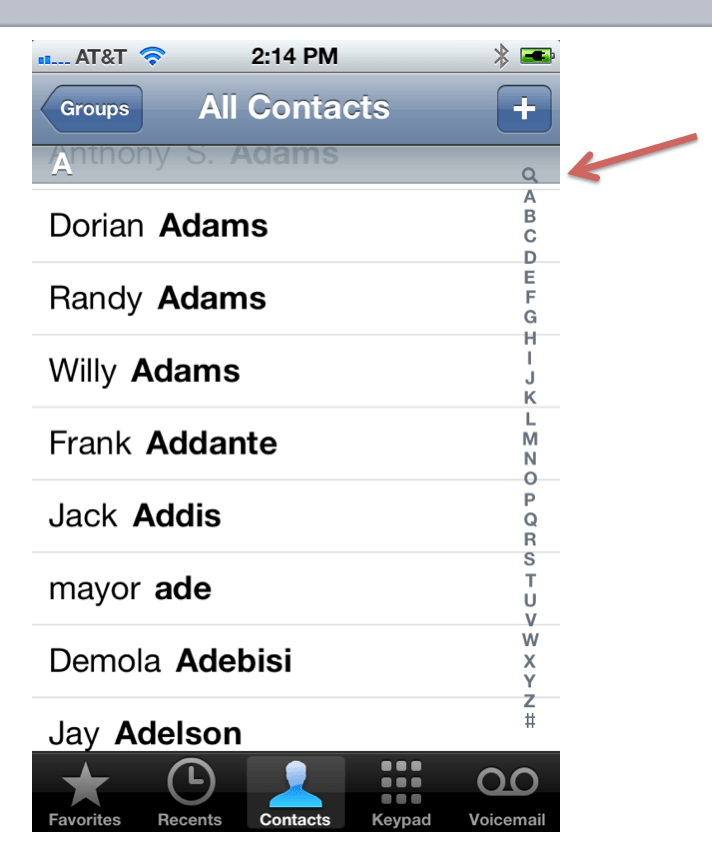
Have you ever done a search in your iPhone contacts? You need the fingers of a poorly fed six-year-old to activate that search function. No, really, I must waste four or five minutes a day trying to make that damn thing work.
Seriously, how can an adult finger ever touch that little search icon without either hitting the “A” or the “+”????
And then there the precious internationalization feature of the keyboard (see image at right). I must turn my texts and emails into Kanji ten times a day. And this is a feature??!
There are countless other examples of irritating UI features on the iPhone. Inconsistent navigation is a primary one, but …OK. I’m going to really stop now. Because I know, learning how to use the tools of computing is MY job, and I’m clearly falling down on it. I know there are ton of tips and tricks that would make my life easier, if only I took the time to learn them. If only I spent hours a week on the Mac tips websites and such. If only I wasn’t busy…writing rants like this one.
And I know that Andriod and Windows are hard to use too. And no, I’m certainly not going to install Linux.
My point is simply this: This stuff is too complicated. There has to be a better way. And while it used to be that Apple was the brand which uncomplicated computing, for me, anyway, that’s simply no longer true. Does anyone out there have similar experiences, or am I really an outlier?
Sorry to break it to you, but you’ve been using Macs for almost *30* years.
DOH. I’ll fix that, but not proudly.
I had the option of buying either a PC or a Mac as a laptop for work. I chose the Mac because I wanted a Mac. What I did not realize was the difficulty it would have opening acrobat pdf over a server. Constantly freezes my machine and I have to reboot, just a tad irritating. I have had more beach ball of deaths with this one computer then I have every had blue screens with my pcs. I have also had to do quite a few hard restarts too, So Mac does have it issues and you are defiantly not the only one, and it came with Lion.
I totally forgot about the spinning balls of death. I get those all the time with Mail, in particular. And with PDFs! And with iPhoto…I mean, I use Force Quit so much it’s like my favorite application….
Not as sexy as blue screens of death, huh?
Could be worse if you combined the two. And I don’t mean beach screens of death
Or the blue balls of death
Acrobat is a piece of junk – that’s not Apple’s fault. There are far better, and cheaper, products to view and edit PDF docs.
Acrobat works like a charm on Windows 7. In fact. I think that is the point. When on an Apple machine, you are quite often restricted to using Apple software. You have to go out of your way sometimes to use other software. With Windows, it’s all about the other software, leading to competition (except for adobe, anyway).
This iphone will be very easy to use!
Pretty please link to that image, Narendra!
@johnbattelle:disqus it apparently originated on reddit – http://www.reddit.com/user/avfarooq
I, too have been using a Mac for nearly 30 years now, and an iPod Touch since they first appeared, and an iPad for 2+ years now. I’m still waiting to get an iPhone, and probably will in a couple weeks. I had been waiting for the Verizon iPhone, but then Google gave us all free Nexus Ones in 2010, and I’ve stuck with that, until now. Because of my other iOS devices, I pretty much know what I’m getting into, but I’ll cosign your comments on these apps really aren’t that good. e.g. I always had trouble with syncing iPad & iTunes when it would say something like: “These don’t match. would you like me to remove everything from your iPad or everything from your iTunes?” No. I’m also getting upgrade fatigue (after nearly 30 years!) I’m still running Snow Leopard, don’t want to get too far behind, but not really eager to upgrade to Mountain Lion and iCloud. Why not stick with an Android phone? This. Ain’t. Easy. there either.
Everyone is running around making apps that Don’t Matter. We need some true visionaries who can solve this Problem.
> “These don’t match. would you like me to remove everything from your iPad or everything from your iTunes?”
Yeah, I couldn’t figure that one out either. Also, if you have an iPad and a iPhone and want to have different things on each it seems you’re either screwed or the procedure isn’t obvious.
It should be dead simple to copy files to and from these devices:
1. Connect cable.
2. Drag files to folders that mount.
My camera used to work that way with my Mac back under Tiger, then OS X changed it to where I have to use iPhoto for everything and no longer can see the directories on the phone, and have to wait 30-45 minutes for it to complete reading every single photo so it can make a thumbnail before it will let me decide to import one photo.
Apple doesn’t want you dragging stuff to folders because they want to control, monitor, and charge fees for each file movement.
Much of these issues are due to licensing, not Apple. You cannot sync the iPod with multiple computers because of music licensing restrictions. This causes messages like the one you described. Everyone was blaming Apple for the DRM on it’s music when it was clear the labels required it by contract. The Internet is a fascinating place where people with no knowledge post their opinions based on their lack of information.
Then why can you do it with (almost) any other music player?
Because they ignore licensing.
Since when was it Apple’s problem when they give you .mp3 files anyway?
Your sync problems are probably caused by trying to sync a mobile device to more than one computer.
Yes, but some of us have more than one computer and like to be able to transfer files between them, and our phone. iTunes simply makes this a MASSIVE pain in the ass. I have used iPhones and iPads for years but never was a Mac person, and cross-platform issues have finally defeated me. My next phone will be an Android, where I can just transfer a podcast to listen to on my phone without having to “re-sync” to the new computer.
If this is mainly about music files, iTunes Match gives you access to all your music from every device (even those you didn’t buy from iTunes. “Syncing” is no longer an issue when it comes to music.
I agree John… I have several Macs and several PC’s and several iDevices. And the Apple products do seem to be travelling down the age old path of diminishing usability returns as they add features. Both Apple and Microsoft are going to regret their efforts to make desktop computer user interfaces that mimic their phones and tablets. The good news for Apple is that Windows 8 is a complete goat rodeo, so Mountain Lion will seem like a joy to use by comparison.
Mountain Lions, Goat Rodeos….and Android robots. Sheesh.
Other: As far as I know this can for example be stuff like mail, or additional content that apps have downloaded. Or at least it was like that when I still had an iphone.
I have no doubt there is a very good reason my “other” is full. And I am sure it can be blamed on me. The point is it’s impossible to know what it is without wasting hours or days of my time.
I’ve had quite good luck in this sort of circumstance making an appointment at the Genius Bar to talk to somebody in person. Computers just do too much stuff now for everything to be intuitively discoverable – you sometimes just need to have somebody to ask.
I plan to – I am sure they will help.
john — congratulations for coming out of the closet as an old-skool Mac user who’s disenchanted with the new Apple world. i’m with you. iOS just plain bugs me; my Android phone is very unfun but if i’m going to be annoyed with my portable brain, it may as well be a cheap portable brain that costs $40 a month for unlimited everything.
to me it feels like many Adobe products have gotten more and more professional/expert-oriented, while Apple’s have gotten more and more limited… yet i find them awkward just like you do. iPhoto is a mess; they’ve pretty much abandoned iMovie in order to hawk FinalCut; and Address Book has always been so inadequate that i repeatedly try it then resort to — ok this is absurd — a database i built in FileMaker Pro 5 many, many years ago. at least i can make all the fields i want and track tons o’ information within the database! i use Adobe Lightroom, switch back and forth between different versions of iMovie depending what i need to get done (committing to whatever the new FinalCut is like means not just money but a bunch of time learning the software). Mail is so-so compared to ancient but intuitive versions of Eudora. (Now i use gmail, but like you said — it’s not Mac, i’m not *expecting* it to be all that great.)
i’ve actually heard that Windows 8, across platforms, may fill the gap. a weird idea, but heck, at this point i suppose i’ll try anything.
it may be that aging, old-skool Mac users are an endangered species and we should just move along quietly. Kids Today are accustomed to the new normal and have no reason to think these products should work any better or differently than they do…
I am, I believe, indeed an “aging, old-skool Mac user.” Sigh.
yep, we’re aging right along. i haven’t written for Wired in at least ten years. being able to say something like that makes one feel… old…
You are an idiot!
And you are so polite for sharing that thought… try and give a reason next time and maybe your fanboy friends will give you a gold star!
Actually, critical thinking is very un-Apple-Fanboy-ish so maybe you did the right thing.
You are kidding about Adobe becoming more professional, right? I just canceled my Creative Cloud membership because all of the CS6 suite (mainly Photoshop) has so many bugs that it has been slowing down my workflow. I have never done this before, but I am actually in the process of writing a blog post about how pissed I am at Adobe for CS6. I should have it done during the weekend.
Some of my worst moments on a Mac come when working with software developed by Adobe or Microsoft. It’s like entering a parallel world where I’m back to Windows-style overcomplicated settings screens and complex, multistep installation routines. I avoid both as much as possible.
hi jaystrab, freediverx – i think by “professional” i did mean “overcomplicated” and “complex, multistep” etc. i don’t have CS6 and can’t comment on its bugs. what i’m trying to say is: i’d like something that falls on the spectrum between iPhoto and LightRoom , plus the equivalent of MacPaint-meets-Photoshop and Pages-meets-InDesign shipping with iLife. i don’t need 98% of what Adobe products can do and i need more/easier/”intuitive” adaptations of what iEverything now does…
Is it CS6 or the Cloud that’s the problem. I haven’t upgraded. Not even considering a cloud based solution. I couldn’t work without my creative suite (5).
Oh don’t mention filemaker. The most beautiful little database that could. And where has that gone in the past years? Nowhere. So many great touches but it has not kept up. If only they had sold it to another company that really cared, it would have been a world beater. So sad.
sholto – i’m so with you! even though i didn’t do anything terribly complex with it or upgrade, it was so easy to make stuff in it. you could feel its HyperCard lineage. that sort of thing is what some of us old-skoolers miss: the feeling that you can adapt anything to your needs without going into Terminal or AppleScript.
I do not use Apple much, so I will not comment on the content of the article, but you should really fixed this sentence;
You have to have to have the fingers of a poorly fed six-year-old to activate that search function.
I am sure there is such a thing as a perfect interface, I have yet to meet one. An Apple software never seem that good to me when I have been forced to work with it.
Fixed! Thanks for that!
I love Android Samsung (and my old HTC Hero) even more after I read this article
My GB mail and thousands contacts on gmail/contacts, calendar always ok (synced fast)
If you reset or change phone all magically ok again
Even many app , and all paid ones ok.
If you need power, rooting is not a real “jailbreak” it just works.
I can choose and use my phone without any unreasonable restriction.
Only catch.. if you use too many appications same time things slow down…. lol
Thank you for posting this. Between these issues and Apple’s frankly arrogant pricing of accessories ($30 for a mere power cord, now also stranded in obsolescence), Apple has long needed a good talking-to.
You act as if Apple is listening. Trust me, they are not.
ForceQuit also has the most ‘plays’ on my MacBook, jbat. I was moderately OK with Apple until Lion, but it is an epic piece of hammered dog crap. iPhoto is driven by some insane kind of pretzel logic that has always escaped me. iCal – don’t get me started. And the new one, with the ‘leather’ interface *that you can’t change*?? (a) The vegans must love that, and (b) since when can’t you customize something that frivolous on a Mac? The whole thing makes me sad, and mad. I’m trapped like a rat. It’s like what Churchill said about democracy — it’s the worst form of government, except for all the others. Sigh.
YAY I LOVE SEEING YOU HERE DENISE!
What about the disfunctional log-in screen on Lion? Click, click, click where the hell do I click to log on! How did that ever get out the door. No fix, but you can change the picture, wow.
Great thoughts John and your frustration is apparent, I am not sure however, whether your frustration is not more endemic of the rapid transition in user preferences that has happened in the past 18-24 months….multiple email accounts, tens of thousands of photos, a comfort level with the MAC desktop OS and our belief that the iOS should work in exactly the same way, minimal phone usage, maximum txt usage, and massive data intensive apps.
The list goes on and I am with you, right now it seems Apple is on a Microsoft-esque development/upgrade cycle with no thought as to how user habits are changing more rapidly than their own hardware and software upgrades. For a company that produces one of the best/easiest cameras ever invented, you would think Apple would have mastered iPhoto and as we both know….they aren’t even close…. patience grasshopper…consumers will speak with their wallets and Apple will either catch on or someone else will eat their lunch, most likely a company we haven’t even heard of yet…
I certainly hope so. Please point me to it and I want to invest.
Great post – Apple’s glory years in UI design ended with OSX, replacing intuitive user experience with brushed aluminum panels and now app icons. I too have been mostly mac since the mid 90’s period when I had Macs and Win NT boxes on a very delicate ethernet network, but have similar issues to the ones you describe with today’s Apple experience. IOS is falling behind Android rapidly (forget the hardware rev, that’s the jewellery market) and Apple’s walled garden is becoming more and more disjointed.
There is a gap in the market at this point for someone to be more like Apple’s holistic past. I don’t think msft can reclaim that space and Android is still too rough around the edges on most of their devices. I waited for the new iphone before deciding what my old iphone replacement will be – at this point it’s a Galaxy, and I am thinking seriosuly about updating my macbook air with a cheaper pc clone right now, just for experiential reasons….
“There is a gap in the market at this point for someone to be more like Apple’s holistic past.” agreed! i’ve wondered whether some smartypants someplace is doing this. i think the iApple world is great for what it is and for the people to whom it’s marketing. i’m just not that market and i don’t feel well-served by Apple anymore.
The level of stupid in this article and related comments is maddening.
AH, finally, the Apple geek fanboy comes out. I know I’m stupid. Thanks Apple, for making me stupid.
I read this whole thing and then got to the part about the iPhone contact list, and then realized some of your issues are probably just operator error.
The little magnifier icon is just part of the letters on the side, which you can slide up and down with your finger to navigate your contacts quickly. So to get to the search box quickly, which is at the very top of your contacts, you just put your finger anywhere on those letters and slide to the top to reach the search box.
Alternatively, you can just tap up on the clock, and your contacts will scroll quickly to the very top revealing the search box. Easy! (works in lots of apps btw)
Enjoy the 5 minutes per day I just saved you.
So intuitive he needs to be told how to do it… kind of the point.
There’s about a dozen people now in this thread smugly bragging how clicking on the clock and performing some kind of gesture is the obvious and intuitive thing to do for search and that it’s obvious that clicking on the magnifying glass icon is the wrong thing to do and no reasonable person would ever click on a magnifying glass icon to do search.
These people seem to genuinely not be aware of how insane they sound.
Each subsequent post they make about this method of doing search increases my desire to attack them with a briefcase filled with rabid bats.
That seems a little harsh
Or put another way, RTFM (Read the Fucking Manual.)
Except the bespoke case that the iPhone came in didn’t really have one. And Apple is supposed to be the device maker where you don’t have to read the fucking manual.
To be honest, it feels like you are hating on it just for the sake of hating. That’s the feel I get from your article. I normally like reading your articles, but this one felt like mostly whining.
I’ve stated two simple ways to accomplish what you wanted. One of those, tapping at the top of the screen to scroll to the very top, is used all across iOS. The other, scrolling on the letters, seems intuitive enough to me.
I’m not arguing that there aren’t issues in iOS and OS X, but I don’t think you can count this one as one of your issues. It’s both simple and intuitive.
God, I wish it was hating for the sake of hating. But I’ve literally lost weeks of my life over the past few years to managing Apple products. I feel like my lament is real.
Manual (http://manuals.info.apple.com/en_US/iphone_user_guide.pdf) Chapter 3 (Basics) on page 20, Scrolling… describes both of these features. That took me about 2 minutes to find, and actually describes both methods I mentioned.
To be honest, these days, I’d rather have a manual in digital format like this, which is nicely searchable, compared to the tree killing paper variety that I tend to throw in a box and never look at again.
To each his own!
Your link goes to:
> We’re sorry.We can’t find the page you’re looking for.
I wonder how big that manual file was though before Apple removed it from their site. Possible as big as a couple of the ultra high resolution icons for the Retina displays? Well, that would have taken up too much space to include on the phone itself obviously, and now we see Apple has removed it from their web site as well, that’s probably a huge space savings on their server, along with all the other documentation they are constantly removing.
We bought Macs for the build quality, we didn’t mind paying a premium because they lasted longer. To me it seems that iOS exists for one reason: to shorten the life-cycle.
I’m writing this on a five year old MacBookPro running 10.5.8. It still does what it did when I got it.
Pre-posted by mistakes.
Clearly this post just got noticed by an Apple fan site.
No one can touch the usability of the Apple hardware (holding aside the home button) but I too find the software unusable at times. The in app menu systems can require so many touches its shameful. I photo is unusable and itunes is only used because it’s the only option for us.
We are be fair – I haven’t seen great alternatives from android or pc, but agree apple lost an opportunity to remain a leader.
John, Everything you say is so damn true. Apple has become a nightmare version of Windows NT. Nothing works like it should. Why am I always in fear of deleting all my photos and songs on all my devices by “syncing” the wrong way? Why is iCloud like using Russian politburo software? Why can’t it just — you know — work? Why must everything Apple make seem to be built for 18 year old wannabe DJs instead of people who actually work for a living? It’s infuriating.
YES!!!!
Damn these young whippersnappers and their newfangled computer thingamajigs!
Great article. I think there’s a business opportunity for someone to build a “professionals” simple phone with: 1. great phone / address book interface 2. enterprise and gmail simple to use 3. Evernote integration 4. Simple browser. 5. Swype keyboard 6. Good camera. Jobs himself was the master of saying “no” to stuff. I find myself wanting to say NO over and over to the many features and bloat in the iPhone, iTunes, and new OS.
Oddly, that’s what Blackberry WAS.
*psst* Still have a blackberry. It still works. Don’t tell anyone though. BlackBerry is supposed to be dead and gone 🙂
I’ve never used a Mac, but I have been an iPhone user since the first one… I have an iPad and recently got a Nexus 7. I LOVE it. Not so much because of what it does. But because of what it doesn’t force me to do. I feel like I have to jump through hoops with my iPhone. I can’t wait to replace my iPhone. I’m not sure with what, but I know it won’t be the iPhone 5.
If I were an Apple analyst, I’d be listening to these comments….
You are kidding right? Apple ‘listen’ to complaints? They pretend to be the ‘Rolls Royce’ of computing… and we all know what happened to them… (typing this on my Macbook Pro running Windows 7 using Bootcamp ;-)… )
You missed the full phrase: Apple ANALYST
If you were an Apple analyst, you’d glance at customer satisfaction data and realize that an overwhelming majority of Apple users are far happier with their products than competing products.
When you are trying to hit the search magnifying glass in contacts start lower down and then slide your finger up and it will appear if it doesn’t. Hit right at the top of the screen where it says the time and it will take you to the search bar.
I appreciate the tip and will use it. But man, did I have to write a 2000 word post to learn this?!
I’ve never been able to press it myself either, so it’s not like you and your wife are the only ones. I’ve had every one of the problems you mention in the article and I’m a pretty capable engineer. I find a lot of the iPhone UI to be infuriating. Cell phones in general as well though, it’s not just the iPhone.
try winphone7 (or the soon to be released winphone8) and you will be shocked (pleasantly)
Hi, you can just drag the contacts down to reveal the search box. This also works in the music app and other lists. Hope this helps.
Chris.
You are just stupid. Every child knows this.
The search bar remains at the top of the list at all time now.
At iOS 6
On iOS 6, You can see what is hogging up storage down to specific apps. The “Others” usually are apps like Rdio offline sync features. You can see how many spaces these apps use in iOS 6
My Android has a search button at the bottom that works contextually in whatever I’m in at the time. My advice is stop thinking Apple is the top of the tree and try out a phone running ICS or Jellybean – you’d be surprised Google took a massive step forward with ICS.
+1. I’m not a Google fanboy, but, Android FTW.
Whenever I use an ipad I’m forever looking for the ‘back’ button.
Having said that, I think the newer android systems, while prettier and better performing are actually more confusing to use.
On my blackberry I just start typing and it starts searching. I never use menus, hunt for settings or anything for that matter.
Yeah I really miss that about the BBerry
Surprise, in Android Jelly Bean they replaced the search button behaviour with Google Now.
No, you didn’t. Most 12 year olds know this already.
Using iOS 5 here. You can just touch the clock up there and your list will scroll all the way up to the search bar.
I feel your pain with all the other shit, though. :/
In addition to the other suggestions about sliding your finger up, or scrolling to the top of the list to reveal the search bar, you can also use spotlight search to find contacts and bypass browsing your contact list altogether. It seems that a lot of people aren’t aware that this is an example of what spotlight exists for, which is probably a usabilty or UX issue in and of itself. In any case, start using spotlight (swipe left from home screen) to find anything on your phone … you’ll feel dumb that weren’t using it all along.
Spotlight search on a Mac computer is INSANELY slow and annoying. and the 3rd party apps that attempt to replace it are largely based on … guess what … it.
Meanwhile, on my Windows 7 machine, which rarely offends me, I can run all manner of fantastic Spotlight-like search apps (locate32, everything search, etc etc). Results come back instantly. I don’t lose my place in the finder when I run a search. Etc.
I frequently utter these words while attempting to do something on my Mac mini which is currently running some OS named after a big cat from like 2 years ago [and I will not keep updating to their newer, “better” editions]: “I’m sorry. Am I interrupting something?”
What a crock! Spotlight is super fast. Where do you people come from? Another planet?
If you have large backup volumes (including time machine backups) or large media files like photoshop scratch volumes, this can slow down spotlight tremendously. The fix for this, and optimizing spotlight in general, is to go into the spotlight preferences and exclude particular folders or volumes from spotlight. This is, stupidly, under the “privacy” tab in the spotlight preferences.
There is usually no reason to need to seach the backup volumes, and it spotlight tries to start indexing during a backup, it can slow things down to a crawl.
To John Battelle’s point, why isn’t the OS smart enough to know not do do this on it’s own?
I am by no means an apple fanboy and agree that there are plenty of good alternatives out there but I can’t help but feel that some of the criticisms here are slightly unfair. I thought sliding up to the magnifying glass was fairly obvious and I personally find hitting it directly very easy. Besides, it would seem apple have provided more ways than most to search for things like this, such as the spotlight feature to the left of the home page. I do agree with you though that it seems apple are losing their touch more and more. I dont believe that they are the steps ahead that they used to be
I’m embarrassed to say how long it took me to find out about the magnifying glass… It needed my whining to an iPhone user about my iPad to find about this… But then again, I’ve not found many of the ‘intuitive’ features that easy to find…
no, you just had to use an iPhone for five seconds to realize that everything slides and rubber-bands, of course you can slide up to the Search, since you can slide the entire list and the magnifying glass is located in the list of letters.
It’s a very long list to “slide” and often is confused and stops on a letter. Instead I now use the “tap the clock” tip.
Note that on the Contacts screen, the index on the right is ordered just like the section headers that are across the width of the screen. The magnifying glass is right above A, so the search bar is right above the section header for A.
If you accidentally click A on the right-side index, and are taken to the first A contact, just scroll up and you’ll find the search bar right there 🙂
“Have you ever done a search in your iPhone contacts? You need the fingers of a poorly fed six-year-old to activate that search function. No, really, I must waste four or five minutes a day trying to make that damn thing work.
Seriously, how can an adult finger ever touch that little search icon without either hitting the “A” or the “+”????”
=====
You don’t need tiny fingers. Don’t you just scroll all the way to the top? Or hit the time clock at the top to scroll all the way to the top? The search feature doesn’t require you to touch the hourglass. You can also touch any of the letters on the side and then just push your finger all the way up.
Honestly, why on earth does Apple think it’s intuitive to hit the f*cking CLOCK to get to a SEARCH menu? I mean, WTF!?
i think youre trying to be mad when in reality is really easy… just scroll to the top to get the search. and hitting the top bar to go to the top of a list is available in almost every app for those who know about it and who dont want to flick scroll all the way to the top.
It’s an idiom that’s present literally everywhere there is a list view in the OS. Tapping the bar at the top of the screen scrolls to top. It’s been this way for at least 3 or 4 versions of iOS.
Yeah I get this. It was a profound revelation to me when I stumbled on tap the clock to scroll to the top. Idiom is not the same as intuitive. I agree that Apple UI competency has been in general decline while Microsoft seems to have reinvigorated their UX with the UI previously known as Metro. I used to consider Microsoft Outlook as the worst application I’m normally obliged to use but iTunes has knocked Outlook off that perch. I was going to have a moan about Mac performance but actually I think that’s still one of Apple’s strengths. My old MBP can’t be upgraded to Mountain Lion and the fan comes on now pretty much as soon as I log on but it’s 6 years old and still useable (by my wife ;-).
mountain lion is bloatware … with 4gb ram, still can’t avoid the beachball in much use
apple is the sharper image of the times, and will suffer the same fate
Interesting.
You desperately need to upgrade. 4GB of RAM is not nearly enough these days. Consumers should have at least 8GB in their machines by this point in time and would be better off with 16GB.
Agreed. 8GB is pretty standard now.
4 gigs is pretty much the standard in most pc’s nowadays. Only professionals running some pretty intensive software should need 8-16 gb of memory. I’ve used some hpc systems that only had 16 gb of memory.
amen.
Syncing between Address Book (with its hideous, unnecessary skeumorphism) and an Android phone doesn’t require a ‘hack involving Gmail’ – it involves digging down into the non-HIG/non-intuitive Address Book preferences and enabling syncing with one’s Google account.
Address Book/Preferences/Accounts/On My Mac Local/Synchronize with Google
No, I’m not making this up – apparently, Apple consider Google to be ‘On My Mac Local’.
Words fail me.
Via Gmail, I believe.
No, it’s not via Gmail. It’s a direct API link via http/s. If you enable ‘Sync Now’ on your Finder toolbar, you can manually trigger syncing at any time.
My Mum was enticed into the Apple ecosystem in about 3-4 years ago. Around the time she converted my nickname for her was “Techno Gran” since at that time she was not too bad at using her Sony All-In-One PC. She now has an iPhone, a MacBook, an iMac and an iPad. She recently said to me that she wished she had never bought an Apple product. She has now been reduced to the level of a bumbling technological idiot by the Apple products. As an example, recently, she could not work out how to do a seemingly simple task such as downloading some photos from SkyDrive and transferring them over to her iPad. In the end I had to do a remote desktop session to help her. In another instance she had bought the latest version of iWork and asked me to install it for her onto her iMac which was not that old. When she tried to install the upgrade herself she could not work out what to do. It turned out that before we could install the latest version we had to upgrade the entire OSX, this required ordering a DVD from Apple. She lives out in the country so this took a few days to arrive by post, I had to go back home and by the time the DVD arrived I was not there to help install the upgrade, I forget how it worked out in the end. I feel sorry for her since she makes a real effort to use technology and she really does not need to deal with the extra technological frustration the Apple products are causing her. She thought she was buying into simplicity and it has turned out to be a nightmare for her.
She recently told me that she wishes she had never bought an Apple product.
I have been developing my own theory that Apple products are the technological equivalent to junk food psychologically fattening an already physically obese populace. Like the Sun newspaper their products are encouraging us to be lazy and dumb down our intellectual capacities.
I think the bottom line is that, in spite of the latest glossy advertising campaign or shiny new phone, there are no silver bullets, technology like fitness requires constant effort to maintain and advance. If computers are going to help us resolve some serious problems that we as humanity collectively face we will have to up our game and our expectations considerably. We need to make a consistent and determined effort towards that end.
“technology like fitness requires constant effort to maintain and advance. ” very well put.
Thanks John! This article by Kevin Kelly helps me maintain some motivation http://www.kk.org/thetechnium/archives/2011/04/the_art_of_endl.php
Love me some KK.
I am a relatively new convert to a mac after many years working on and using windows and i really don’t see what all the fuss is about. I love my computer and my iphone and all that but I don’t see any massive leaps in user experience which i expected. I need to use Logic pro for stuff so I use a mac. Itunes works much more fluidly I have to say, but other than that I don’t feel much of a difference.
WTF? To move photos to your iPad, you simply download them to iPhoto on your mac and then sync them to your iPad through iTunes snc process. What is so hard about that??? A 6 year old could have figured this out, or just google it for easy quick answers. Further, it is comical that your mother couldn’t figure out that she had to insert the new OS DVD into her computer, click on it and it would load the software with clear simple steps, certainly exponentially easier than even figuring out what version of Windows you should be then load. And you couldn’t explain this over the phone! Total nonsense!
Different ways to find out your version of windows =
1.Use your Eyes, each version of Windows is radically different
2.click on the start menu then type system.
3.click on the start menu, click control panel, then click system.
3A.If you use windows 8, go to the Desktop>Charms Bar>Control Panel>System
Same amount of steps as a Mac, but different enough for a new Mac user to be dumbfounded.
On the other hand, how logical is it to sync pictures through iTunes?
You don’t use iTunes for pictures. You use iPhoto.
Click on the start menu? Really? It doesn’t say “Start” anymore. It’s a damn circle. Of course going to the start menu to shut down always made me smile.
WTF is a charms bar? (I have sindows 7)
Mac — go to the apple menu and choose “About this Mac” It’s been in the same place for 30 years.
I use both Mac and Windows. Now that Windows has yet again copied the user experience (as much as they could) from OS X, it’s mostly easy to understand. I’ll never get over the finger gymnastics that one has to use on a Windows machine to press the control key. They should have just moved the freaking alt key. Or changed its functionality since it hasn’t been much use since 3.1.
I’ve already ranted about my Mac problems. Lately my PC is a godsend. I just don’t want to spend thousands of dollars buying all new versions of my professional software for it. I’ve mostly used it for running crappy little apps that aren’t available on the Mac.
Read before you troll. I said SYNC using iTunes. You add photos ove iPhoto, but your library is synced over iTunes.
The start menu is still the start menu. If you need it to have sticker on it to remind you of its name I suggest you put a post-it note on your screen. For everyone else that’s had it in the same place doing the same thing for 20 years we’ll just use our heads okay. A BMW is still a BMW when you buy it with the badges removed. And please, explain your hatred of circles to the class, tell us how you feel because we really care. Do you hate your iMac power button too?
The charms bar is a bar that pops up on the left side of the screen that is used (among other things) to access things typically reserved for the options/preferences menu on Windows RT. When you’re on the desktop, you can access system stuff from it.
Control needs finger gymnastics? What are you, Arthritic? Ctrl-Alt/Ctrl-Shift is so incredibly simple with finger and thumb that this comment beggars belief. Are you serious, cos I have more problems hitting Apple+Cmd due to them being so close together that they force two index fingers to be used… but I accept that as habit and not a flaw in their design.
And please, I beg you poor Win7 user, explain what Windows stole and for every single one, I will describe two things OSX stole IN THE SAME GENERATION. Believe it or not, Apple are innovators, that means they steal stuff and make it better. Do not mistake that for invention.
What I would like to know is how you have had your phone for a year and only have 0.10GB of apps? Something is definitely wrong.
That was because of the restore I did. It wiped out all my apps. I only put back those I really wanted.
Nope. Not an Outlier. I hear ya. I could relate. Same frustrations and walls I’m bumping into over here. I feel recreated by your post. Thanks! Yep, I agree with you that Apple products are no longer easy to use.
And iCloud? I’m not a fan…no, no, no on iCloud. I was testing iCloud email and it went dark on me two+ days of this week. Zero access. No offline access either. Nothing. No notice, no acknowledgment, no communication. Unreliable. All I got were clinical updates from what seemed like a support…bot…that I had to search for to find out what was happening to my email. (See attached screenshot.) My experience so far with iCloud email is that you’ll be left hanging and in the dark and it’s a breakdown on their side. John, can you imagine your email going down for two+ days and getting weird updates from a bot-like twitter feed? It’s like talking to a wall. (I know. I know. It’ll be nice to get a break from email some people will say, but that’s not the point.) Luckily, I wasn’t using that email for business. Lesson learned. I’m not trusting iCloud with my data again until it the overall experience and actual use of it is reliable. Bummed as whole experience was not representative of -my perception of- Steve Jobs’ Apple brand. Upset expectation. Anyhoo. [End of my rant.]
The views expressed here and anywhere online are my personal views and do not represent anyone or anything other than me.
I have been using Apple computers since 1984 (Apple IIc). I like OS 9 a lot better than OS X as far as the UI goes. I do have to agree with some users here, though, that you are hating because you have had some bad experiences.
What you really have to realize is that ALL operating systems suck. Windows, Mac, Linux, it doesn’t matter. None of them work the way that I (a big fat capital I) want them to. And they certainly don’t work the way they should when they have to. For example, when I need to get this web design done by tomorrow night and Photoshop crashes repeatedly.
The only OS that had hopes of being any good was BeOS, and that was pretty much abandoned.
Anyway, my point is, these things are machines built by humans. You will NEVER – not now, not in 2000 years – get a computer or any other device that is going to be the best thing ever or the simplest thing ever or the safest thing ever. Humans don’t make things like that. So if you’re going to get flustered because things don’t work the way you want them to, you might as well just go and buy one of these (which also has its problems)
LOL you have never had to use BeOS in production…
If they all suck, and I’m not questioning that, then why should I, as a consumer, pay a premium for any version of Mac OS? Their machines cost more then comparable hardware from PC OEMs. So if, all else being equal, and one is more expensive then the other…
There are a lot of folks on here who need to take a long, hard look at Windows 7 and Windows 8, I think…
Exactly, I don’t who brainwashed you, but do use windows 7 or 8
I switched to a Mac when I was sold on the idea that their products “just work” and are easier to use. I ran screaming back to a PC within a couple months. I think that the idea that Apple products are easier to use is one of the greatest marketing successes of our time. I am now on Windows 8 and am completely happy. In my opinion, the Windows ecosystem is just better than Apple’s. And, it is not even close anymore.
LOL!
Hahahhhahahahahhaha! Good one, man!
Ohwait – you weren’t joking??? Wow…
I was a Mac user too until forced into Windows 7. Very very content thank you. Still use a Macbook but Windows 7 is a solid OS that is for the most part intuitive to use.
Hey John,
Great article. I worked tech support in the 90’s for Acer America, back when they made a play to compete with Dell (and lost miserably). What I realized then is that the entire PC industry was selling consumers a product designed for geeks–and the results were tragic.
Fast forward to 2007. When I first played with the iPhone, I realized that even OS X, as good as it was relative to Windows, was the same story: a professional OS masquerading as a consumer OS.
iOS is the world’s first consumer-grade operating system. It can’t kill off OS X as a consumer OS soon enough. Mountain Lion and every iteration before it are utterly inappropriate for consumers.
You’ve pointed out rough corners in iOS–and there are many. But it is world’s better than the Mac. It’s a tough balance. Apple is paranoid about being the “3-5%” OS again, and if they rest on their laurels and don’t keep adding features, they fear losing more share to Android. And they may be right. But with each feature comes complexity, and with complexity, the consumer-grade OS starts to look more and more like a 747 cockpit.
Here’s hoping they find the right balance.
Best,
Ben
(btw, you aren’t meant to hit the magnifying glass to search in Contacts on iOS; you pull down with your finger and the search box is revealed. You can also tap the top of the search which will scroll all the way up. There are a few little hidden interactions like this throughout.)
Emphasis on “hidden”, which is bad UI design.
I know I’m supposed to pull down. But with so many contacts, that doesn’t usually work well. Swiping to the far left is the deal. Or apparently, touch the clock.
Yeah, you’re right. If you don’t know about that mystery “touch-the-clock” gesture, it is a pita to scroll up.
I’m not sure I want iOS to win. No file system…
They’ll work that out. It’s not ready as we know it today.
A lot of Apple software has always been a pain to use. Syncing device with iTunes has a number of pitfalls and hoops. Much better with iCloud.
Some stuff is better. Some is worse. In comparison to Windows or Android, Apple is still like a “glass of ice water to someone in hell”.
The “must do better” beseeching is worth it. Let’s hope they are listening. We all want to get to software heaven. But does it exist?
True, iCloud fixed the problem of having to use iTunes in the first place. But it lost contacts of mine in the process of syncing, which was not so good.
When I upgraded my MacBook to Lion about a year ago, that thing completely screwed up my workflow in a major way. All the sudden, I couldn’t save jack and everything was a file permission error precluding work. I had to reboot, run some command/control something or another, and all the sudden I’m in a deep dark hole trying to reset passwords and file permissions, etc. It’s one of the many wheel spins I’ve been getting more often on my Apple things. I’m holding out on any further OS upgrades now — ain’t nobody got time for that!
I switched from Windows to a Maca about two years ago. My motive was that I needed a ‘UNIX-y’ OS to run my development environment plus run Photoshop natively. After some heartburn fairly similar to yours, I’ve come upon the only solution I like–Snow Leopard, without using any Apple applications. I use Chrome, VLC, Lightroom+Photoshop, Gmail, Google’s business mail and I’m fine. I paid for Lion, upgraded and then wiped it out and returned to Snow Leopard. I don’t intend to upgrade the OS.
Oh and by the way, I had to quit using Finder and buy Pathfinder in order to do GUI file management remotely as good as Windows Explorer.
People who dislike Apple’s ecosystem are usually those who customize it to work more like Windows or Linux.
People who dislike Apple’s ‘ecosystem’ are usually those who dislike being force-fed bad, counterintuitive, buggy operating systems whose faults become more pronounced with each iteration.
I moved to Windows after OS X was introduced. The Finder is, still, an insult compared to the (admittedly crashy) Finder of OS 9. Another total POS is iTunes (on Windows at least), Apple really isn’t good at software engineering.
I did exactly the same! Pathfinder looks cool too although maybe a little too mousey for my taste.
Snow Leopard was the last great version of OSX. I’m simply baffled at their recent decisions.
The sad part is that developers march along with Apple’s release schedule. There are already several apps that won’t run on Snow Leopard and require Lion and up.
I’m begrudgingly running Mountain Lion currently and it drives me nuts on a daily basis. I haven’t dealt with an OS release this buggy since Windows ME (kernel panics, apps lock up and won’t close, my wallpaper randomly disappears, Finder crashes, etc – the longer the computer is on the worse it gets). I have to reboot several times a week just to make the computer responsive again. I haven’t had to do that since the early XP days.
The moronic and baffling changes to things like “save as” and the ability to merge folders cause me grief daily. Also they somehow found ways to make Finder worse, the dock worse, expose and spaces worse. Multi-monitor support is worse…. I just don’t understand the rationale behind the systematic dismantling of the best ‘UNIX-y’ OS available.
It’s at this point that I’m actually considering moving to Ubuntu and dealing with trying to get Photoshop to run with WINE.
For a “UNIX-y OS” I would have suggested BSD, but if you’re happy with Snow Leopard, more power to you! (FreeBSD for a more truly Unix-like experience, and PC-BSD for a more automated, slick desktop experience.) And they’re both free (both ways), so always an available alternative (which you can try painlessly with Live DVDs).
I tried free bsd about a year ago. If you’re looking for something simpler than osx, I really wouldn’t recommend it. Btw the bsd oses are pretty much the only unix oses left that can be freely used my everyone, so they get some credit there.
I wish I’d never upgraded to Lion. Caused me a lot of grief!
Too many products are rushed to market these days without proper user
testing, that`s all there is to it. Apple forgets how they got to where they are – by putting users first.
You ARE the tester.
So, because your computer can’t read your mind and do exactly what you’re thinking right away, it’s hard to use? Any technology as advanced as a computer or iPhone is going to have some kind of learning curve. And unless you want Apple to stop innovating, they’re going to continue to improve their software. If you can’t be bothered to learn how to use new features and behaviors, then maybe you need reevaluate your relationship with technology.
Advanced technology should be transparent and appear like magic (sic!). This is the Apple promise, a broken one.
I am.
John:
I have a hard time reading this post. A quote of yours about the “Database of Intentions” hangs over my 27″ Apple Thunderbolt display because I thought it was so profound. This post, on the other hand, reads like the cranky rant of an ex-technologist who simply gave up learning. As Adam says, these things are hard. There’s a reason books, classes, online learning, forums, etc. exist: because mastering these skills require an investment.
Have you tried accomplishing any of these tasks on another platform, namely Windows? It’s a nightmare. Apple has some of the smartest people on the planet working to improve the user experience. That’s their goal, plain and simple. It permeates everything they do. Maybe they don’t achieve 100% perfection, but at least they are constantly working toward that noble goal.
Just look at the millions of people constantly glued to their iPhones: the young and old (sometimes very young and very old), business professionals, IT pros, artists, educators, scientists, doctors. All types of people. They do full-fledged computing on it. Emails, web surfing, streaming, VOIP, phone calls, banking, GPS, photography, business documents, music, watching movies. They do this all day and all night, day in and day out, and their phones don’t crash. They don’t get viruses. They don’t need IT departments to support them. They don’t call family members and say, “Help, my iPhone doesn’t work.” Because until 2007, 92% of people used Windows machines for all the above tasks and it was problems, problems, problems. In fact, they couldn’t do half the things I mentioned because it was too difficult. iOS liberated the masses from Windows and reintroduced them to the wonderful world of computing.
The fact that Apple just introduced the iPhone 5 and essentially sold out of all of their 3:00AM EST pre-order in under an hour (a feat that took 22 hours for the iPhone 4S), should make you take a long look at your position. I’m afraid that yes, you are an outlier.
The outliers, I’ve found, are the ones who may well have opinions worth listening to. I hope.
With you. Calendar is mediocre, I completely ignore iTunes, iPhoto is an unusable CPU hog. Contacts works, apart from when sync doesnt. And I still don’t fully trust iCloud in the way I do Dropbox. 50,000 employees, you would think they could give us a great working core software/service set
If your an Outlier then I am in another universe. I don’t even have a mobile! I am a developer and I have just grown tired of the complexity. I love my vege garden and hate mobiles. Apple starting pissing me off when they put some kind of stupid version system on textedit – WTF? Now closing a texedit file takes like 15 seconds while the OS goes off and does something pointless then comes back and closes the file anyway. And what happened to Save As? Why do I now have to duplicate a file in order to save a version. I am a skilled nerd and thinking of moving to Ubuntu just to get some work done. So if some pimple spotted Apple fan boy/girl can come out of Apples church for a second and help us out that would be great.
So, a year has passed. What do you think of Ubuntu?
Precisely matches my experience with Mac. I know operating systems, and every time I touched a Mac it seemed I became 6 years old again. Easy? In what way .. be precise.
Different, sure. Every OS tries to distinguish itself from the crowd.
So I bought two big beautiful Macs; an iMac for my wife and a MacBook Pro with second screen for myself. One month after using them, I turned them off and the MacBook comes back on every quarter ( or so ). I remember distinctly why I abandoned the Mac; it was the second screen. I need lots of screen real estate for the things I do ( mostly coding or learning with the Mac). There is one freak’n tool bar for every visible app? Are you kidding? Has no one actually used this? I must scroll my mouse from one part of an enormous desktop to the other, just to activate some features in the task bar?
Then scoot back to do something useful on the app. I went to the Genius bar … they provided zero help.
Then there is the fact that Mac is based on a Unix kernel … except it is smothered in OO junk that makes any Unix experience quite useless. Command lines that are “tweet sized”.
Well I did get a book that put the unix/Mac disparity behind me.
Mac
OS X for Unix Geeks
All I needed to know about Lion is that it uses the same IOS interface as the iPhone; I’ll never install it. My brain does not need any more stretching in these dimensions just to use the platform.
iPhoto, iMovie … useless to me. Much better solutions out there.
I don’t need another pretty face on my computer screens … something that is a bit more useful and makes ME more productive is what I’m looking for. I’ve stopped looking to Apple to provide that.
My advice is for you to stop your apple-cultist-ism and install windows 7. You will be surprised how many of the myths around it just are not true any more. I have two windows pc’s (Desktop and laptop) in my home, two apple macs (Desktop and laptop) and one linux server computer. Out of those three systems I must say that the mac has caused me the most grief. No kidding. I aint hating on apple. I’m just saying that the dogma that has caused people to avoid windows (And even linux (Ubuntu is super user friendly these days)) is made up of stuff that was fixed years ago, or hasnt even ever been true. With whatever percieved loss of ease of use you will experience you will notice that if you do run into problems there are far more fixes available on-line than for whatever issue you have with mac.
Gone are the days of windows-blue screens (Havent ever seen one in win 7 so far) and programmer-like interfaces for linux (Well, for the most part) where Apple rode in on a bevelled, white, glowing horse to save the day.
Couldn’t agree more. The only issues I’ve had on my PC has been need for memory (easy enough) and removing iTunes since it was such a horrible system hog. My machine skips along just fine now. No bluescreens, no viruses, no problems.
iTunes imo is malware on a PC. Apple were so religious about not using MS built in stacks, features and toolsets that they literally wrote their own Mac like ones, and then ran it *on top* on Windows’ ones, creating a massive amount of system overhead for no reason. I mean why not? It only makes your competitor look worse.
Don’t believe me. Try running 1080p video in Quicktime player on Windows then use VLC or WMP. I have a core 2 quad (+ a £250 very fast HDCP graphics card) machine for gaming and an i3 laptop for the kids and Quicktime actually can’t play 1080p on either at any more than 5 frames a year. It’s appalling.
Apple has its problems, definitely, but Windows and Lunix are ten if not hundreds of times worse. That’s the problem. I haven’t used Windwos 8 much but. my god, there really is no comparison. And as far as the entire ecosystem is concerned, Apple still sets the ceiling and everybody rushes into imitate. That’s the really sad thing is how badly the others suck.
I’d really like to know what problems with windows you are having? After the initial setup, windows for me is just my start menu leading to my software. Everything else just runs! (Isn’t that Apple’s slogan or something?)
You are not alone… I have come full circle from thinking that Apple’s simplicity was a reason to swing your whole IT life into their stuff, to realising slowly the massive monopoly they are creating where everything is built to be replaced, not maintained. As you say: RIDONKULOUS!!!
Here’s are my experiences since i installed Lion:I’ve about 880 contacts in my address book – syncing to iCloud doesn’t work!
iPhoto is clunky, Faces in iPhoto is totally clueless (and no, i didn’t expect that i would learn how to recognize our twins).
Facetime mostly doesn’t work at all, and iMessages are randomly delivered to some devices (iPad, iPhone, iPod touch).
And iCal is a total desaster – duplicated entries, which i cannot delete and events (more than 1 year old) that steadily come up in my iCal-Inbox, which i also cannot delete!
I outright hate this “iCloud”-nonsense which started this mess (i never had such problems with mobile-me, which mostly worked like a charm).
Some days ago my wife said:
“I don’t know, but it feels like Apple’s getting worse, since Steve Jobs passed away”.
I have to admit, that i share the same feeling!
@johnbattelle:disqus I agree with the commenter who said all OS’s (and apps) suck it is just that some OS’s suck less than others irrespective of the UI claims of ours is easier to use then theirs. If you think iOS and Mac/OS’s suck try any flavor of Windows. You’ve lost weeks with Apple? How about months with Windows. I am a Windows power user of 20+ years and it is total shite. Period. Does anyone seriously believe that Windows is a consumer OS? Give me a frigging break. Onto Google, who has taken ~5 years to sort out Android and to get it to a state comparable to iOS though it did sort of cheat along the way.
Well you SHOULD try linux. It may take a bit of learning to use, but once you’re there, there are absolutely 0 WTF at all. Nothing breaks, Nothing acts fancy, Nothing has a mind of its own that you can’t modify, silence or destroy.
Until then, hf with Apple’s fucked up version of unix, one of the very few that qualify to be worse than windows.
Sounds like the default apple apps just arent right for you. But dont throw out the baby with the bath water. Being a recent convert to the cult of mac (late 2009 – though I had a mac classic for a few years back in the day), I enjoy the fact that for the $40 yearly upgrade/subscription fee I get a nice if pricey bit of hardware with a decent implementation of the unix shell where I can grep, vi and ssh with pleasure and with an awesome window manager (way better than anything ubuntu can throw at us) on top of it. The suite of iApps that comes with osx from my experience are the equivalent of windows OEM crapware – Im sure they used to be good when you started using them ,as they were for me, but i’ve long ago ditched them in favour of other services. Gmail does good for my addresses and email… i wouldnt use Mail as much as I wouldnt use Outlook. Dropbox et al tromp all over iCloud (not even sure how much space i get there, but last i checked 2 iphone backups used up 30% of it – and I cant access any of it easily on non idevices). Adobe apps will be temperamental on various systems at various times. Not apples fault. I think it’s your expectations that have changed and outgrown the free default apps. What exeactly do you get free with windows or ubuntu that will even remotely let you manage 10000 photos ?
Then why not just use a Linux machine? The whole point of Apple products, at least as according to their ads, is that its one big synced world that will take care of you. But you are saying the best way to use an Apple machine is to install 3rd party software. Then why use Apple at all? Just for the Shell features?
No one, since Windows 95, really cared about windows OEM crap-ware. Because Windows was built to let users install their own choice of software.
OK, I have my occasional frustrations with Apple just like anyone else. But I grew a little suspicious as I read through your article, and when I came to this item I knew you were full of it:
“Have you ever done a search in your iPhone contacts? You need the fingers of a poorly fed six-year-old to activate that search function. No, really, I must waste four or five minutes a day trying to make that damn thing work. Seriously, how can an adult finger ever touch that little search icon without either hitting the “A” or the “+”????”
Seriously? You have different ways to search for contacts on your iPhone and none of them require anorexic baby fingers or five minutes of effort.
1) A simple swipe to the right from your home screen reveals your phone’s global search function which includes contacts among its search results.
2) Within Contacts, you don’t need precision finger tapping to activate the search function. The alphabetical index on the right of the screen is used by placing your thumb on the right edge and then simply sliding your thumb up or down until you get within range of names you’re looking for. It’s meant to be “tap and slide” – not precision tapping on a specific letter or the search icon. To search you can simply do this and then slide your thumb all the way to the top of the screen to reveal the search field at the top.
3) The easiest way to search is to tap on the title bar from anywhere within the app which will instantly take you to the top of the list where the search field is located.
Then you whine about internationalization. The only way a Kanji keyboard should be coming up on your phone is if you went into keyboard settings and added a Kanji keyboard! By default you only have the standard keyboard activated.
iPhoto isn’t slow unless you have an ancient computer. If you manage as many images as you claim to, quite honestly you should consider upgrading to Aperture. I have thousands of hi res images going back decades and Aperture runs smoothly on both my 2009 Macbook Pro and 27″ iMac.
Restoring your iPhone will not “lose” your apps. Worse case you can re-download them from the App Store. If you backed up your phone to iTunes while charging – as recommended – you’d have an easy way to restore from backup. And if you used iCloud you’d have automatic wireless backups you could restore from as well. I recently had to get a new phone because I dropped the old one and smashed the screen. At the APple store, it took seconds to enter my iCloud credentials into the new phone. Per the Genius’ suggestion I left the phone there for a half hour while I walked around the mall, and by the time I returned my iPhone’s data and settings had been restored wirelessly from iCloud.
OS X’s features and options have grown more robust and complex over time, but by default, new Macs come with a pretty intuitive configuration. If you or your wife can’t figure out the myriad multitouch gestures then you should have left the default settings alone until and unless you had the need and the familiarity to enable optional custom UI settings.
I agree on the Kanji and the contact search, easy fixes that I will implement. But iPhoto?No. I have a new, fast MacBook Pro.
iPhoto’s organization isn’t that good. But it’s far from slow and it sounds like you have a much faster Mac than I do. I have a 13inch Air.
Just buy a PC and leave us alone!
YOU’RE on HIS blog. Leave him alone!
YOU ARE MISSING THE POINT! With the huge number of photos you try to manage, move to Aperture which is designed for heavy users! iPhoto is a free light weight app, not designed or meant for professional (read large database/number of photos). You claim to be a long time apple user but you show limited knowledge of how apple products work. Why is that? These things are just not that hard to learn by spending just a little time getting yourself familiar with them properly.
It’s 2013. Everyone and their dog has thousands of pictures, not just professionals. Aperture is for pros, correct, but that means iPhoto should be for everyone else. Hell Windows Picture viewer still manages to search through a crapton of pictures without freezing up. If you have a program that is inadequate for the job, you should have just left the job to finder, spotlight and preview.
Thanks so much for bringing a bit of balance to this. Apple products are by no means perfect but they’re certainly not becoming trash. This article sounds a lot like it was written with someone who would be equally frustrated with almost any operating system.
I think its great that ‘ecosystems’ are forming under many different tech companies, you have options and I implore everyone to vote with your wallet. I just can’t figure out the hate when most of what I’ve read is based in user error and lack of googling.
Well said
The point isn’t that it’s difficult to do these things. The point is that he didn’t know, or discover HOW to do these things. I’m a self-employed Mac support guy who sees this every day. People just don’t “get it” anymore, and honestly, I don’t either. I have to study daily to keep up with the tips and tricks that keep me productive to the detriment to my actually being productive.
Marshall McLuhan once said, “The media is the message.” Now, learning is the workflow, i.e., learning how sometimes is more important than the actual job. “Oh, I don’t do or make anything, but I know *how* to do or make something, so I’m valuable” seems to be the future of employment. Pretty soon, we’ll need a one-to-one consultant to worker ratio to get anything done.